In the realm of digital file management, keeping directories organized and free of clutter is a task that often falls by the wayside, given the manual effort it requires. However, with a bit of Python scripting, this task can be automated, saving time and ensuring that your digital workspace remains orderly. One particularly useful automation is moving files based on their age, such as archiving files that are older than a certain number of days. This article will guide you through a Python script designed to automate the process of moving older files to a new directory for better file management. Below is the script:
import os

import shutil

import time


def move_old_files(source_folder, destination_folder, days_old):

    # Get the current time in seconds since the epoch (January 1, 1970)

    current_time = time.time()

    for file in os.listdir(source_folder):

        file_path = os.path.join(source_folder, file)


        # os.path.getmtime(file_path) = Get the file's last modification time in seconds since the epoch (January 1, 1970)

        file_age = current_time - os.path.getmtime(file_path)

        if file_age > days_old * 86400:  # 86400 seconds in a day

            shutil.move(file_path, destination_folder)


# Example usage

move_old_files('/source/directory', '/destination/directory', 30)
Understanding the Script
The Python script provided leverages the os, shutil, and time libraries to move files from a source directory to a destination directory based on the file’s age. Here’s a breakdown of how the script operates:
- Defining the Function: The core of the script is encapsulated in the move_old_files function, which accepts three parameters: the source_folder where the files are currently stored, the destination_folder where files older than a specified number of days will be moved, and days_old, the age threshold for moving files.
- Calculating the Current Time: The script starts by obtaining the current time in seconds since the epoch (January 1, 1970), using time.time().
- Iterating Through the Source Directory: It then iterates through each file in the source_folder, constructing the full path for each file to assess its age.
- Determining File Age: The age of each file is calculated by subtracting the file’s last modification time (retrieved using os.path.getmtime(file_path)) from the current time. The script checks if the file’s age exceeds the days_old threshold, converted into seconds.
- Moving the Old Files: Files that are older than the specified number of days are moved to the destination_folder using shutil.move().
Practical Application and Example Usage
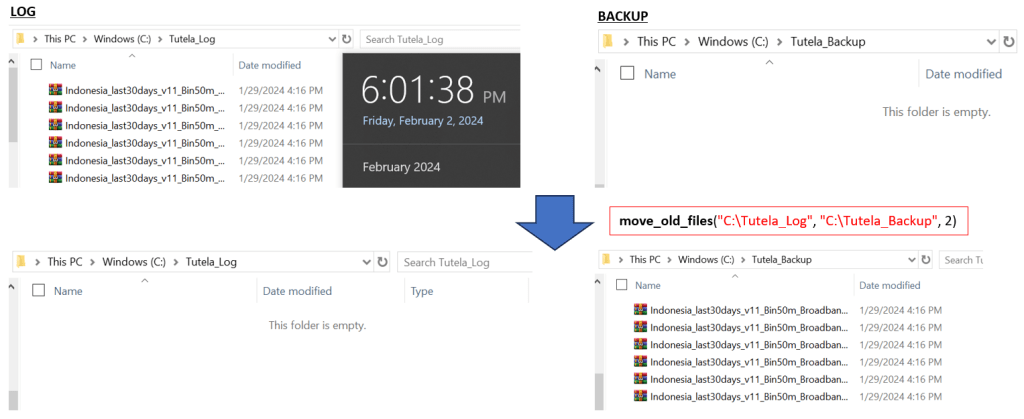
To use the script, simply call the move_old_files function with the appropriate parameters. For example, to move files older than 2 days from my log directory “C:\Tutela_Log” to “C:\Tutela_Backup”, you would use the following command:
move_old_files("C:\Tutela_Log", "C:\Tutela_Backup", 2)Here are the outcomes after executing the script with the given configurations on my computer:
This script can be particularly useful in various scenarios, such as archiving old project files, cleaning up temporary files that are no longer needed, or managing logs and backups by moving older files to a designated archive directory.
Automating the Task
For those looking to fully automate this task, consider scheduling the script to run at regular intervals using your operating system’s scheduling features (e.g., cron jobs on Linux or Task Scheduler on Windows). This ensures that your directories are regularly cleaned up without any manual intervention.
Conclusion
Automating the movement of old files to a new directory based on their age is a simple yet effective way to maintain an organized digital workspace. By leveraging the power of Python, you can easily implement this script to handle file management tasks automatically, saving time and ensuring that your files are exactly where they need to be. Whether you’re looking to archive old files, clean up temporary directories, or manage logs, this script provides a solid foundation for automating these processes.
 Software Technology