In the digital world, keeping your file system organized is essential for efficient data management. Empty folders can clutter your directory structure and make it challenging to find and manage your files effectively. Manually deleting these empty folders can be a time-consuming task, especially if you have a large number of them.
However, there’s no need to worry because Python comes to the rescue! In this article, we’ll introduce you to a Python script that automates the process of deleting empty folders within a specified directory. With just a few lines of code, you can quickly tidy up your file system and ensure that it remains well-organized.
The Python Script
Below is the Python script that allows you to delete empty folders recursively within a given directory:
import os


def delete_empty_folders(folder_path):

    for dirpath, dirnames, filenames in os.walk(folder_path, topdown=False):

        if not dirnames and not filenames:

            os.rmdir(dirpath)

            print(f"Deleted empty folder: {dirpath}")


# Example usage

delete_empty_folders('/path/to/your/directory')
How the Script Works
This script takes advantage of Python’s built-in os module and the os.walk() function to traverse through the specified directory. It identifies and removes empty folders efficiently. Let’s break down how the Python script functions:
- Import the Required Module: The script begins by importing the os module, which provides a way to interact with the operating system, including file and directory operations.
- Define the ‘delete_empty_folders’ Function: This function takes one argument, folder_path, which should be the path to the directory where you want to delete empty folders.
- Iterate Through the Directory Tree: Inside the delete_empty_folders function, the script uses os.walk() to traverse the directory tree starting from the folder_path. The topdown=False parameter ensures that it begins from the deepest subdirectories and works its way up.
- Inspect Each Directory: For each directory encountered during the traversal, three variables are returned:
- dirpath: The path to the current directory.
- dirnames: A list of subdirectories within the current directory.
- filenames: A list of filenames within the current directory.
- Check for Empty Folders: In each iteration, the script checks if both dirnames (subdirectories) and filenames (files) are empty. If both lists are empty, it means the current directory is empty.
- Delete Empty Folders: If an empty folder is found, the script uses os.rmdir() to remove it. The os.rmdir() function deletes an empty directory. It does not work if the directory contains any files or subdirectories.
- Print Confirmation: After deleting an empty folder, the script prints a message indicating which folder was deleted.
- Example Usage: At the end of the script, there is an example usage of the delete_empty_folders function. You should replace ‘/path/to/your/directory’ with the actual path to the directory you want to clean up from empty folders.
This script recursively traverses through a specified directory and its subdirectories. For each directory it encounters, it checks if it is empty (no subdirectories or files). If the directory is empty, it is deleted, and the script prints a confirmation message. This process repeats until all empty folders within the specified directory are removed, helping you keep your file system organized and clutter-free.
Example Usage
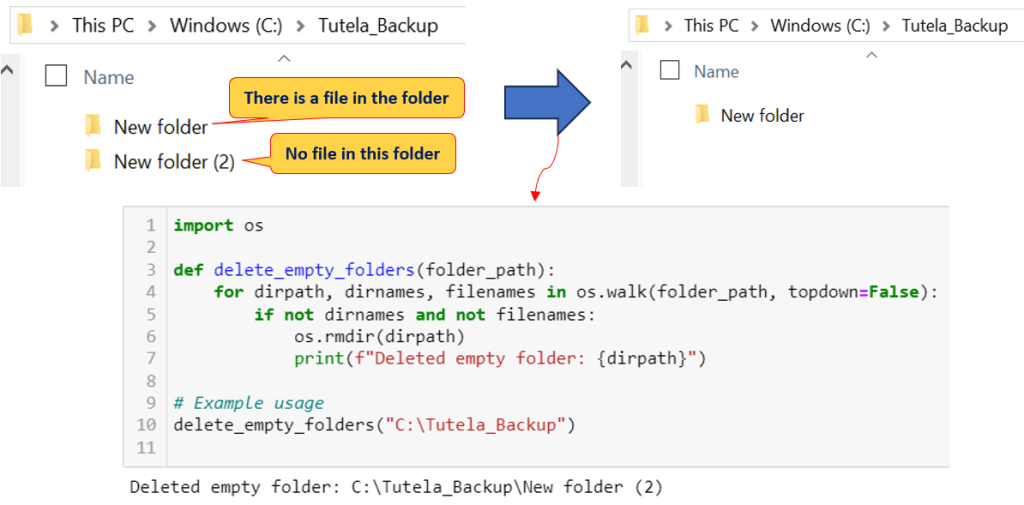
To put the script into action, simply provide the path to the directory where you want to delete empty folders. The script will do the rest, identifying and removing all empty folders within the specified directory and its subdirectories.
Here are the outcomes after executing the script with the given configurations on my computer:
Benefits of Using the Script
- Time-Saving: Manually deleting empty folders can be tedious, especially when dealing with a large number of directories. This script automates the process, saving you valuable time.
- Efficient Organization: Keeping your file system free of clutter enhances your ability to locate and manage files quickly.
- Customizable: The script can be easily integrated into your workflow and customized to meet your specific needs.
- Error Prevention: Accidentally deleting important folders is a risk when done manually. With this script, you can avoid unintentional deletions.
Conclusion
Keeping your file system organized and clutter-free is essential for efficient data management. With this Python script, you can effortlessly delete empty folders, ensuring that your directory structure remains clean and well-maintained. Whether you have a few empty folders or an extensive directory tree to manage, this script will streamline the process, saving you time and effort. Say goodbye to manual folder cleanup, and let Python do the work for you!
 Software Technology