In the realm of data analysis and manipulation using Pandas, one of the fundamental skills is assigning values to DataFrame columns. This task, while seemingly straightforward, offers a variety of methods to suit different needs and scenarios. Understanding these methods is crucial for efficient data handling and manipulation in Python. Let’s explore some of the common techniques for assigning values to columns in a Pandas DataFrame.
1. Direct Assignment
Direct assignment is perhaps the most straightforward method for setting column values in a DataFrame. This approach is highly intuitive and can be used for both creating new columns and modifying existing ones.
1.1. Assigning a Single Value:
If you need to assign a single, constant value to all rows in a column, you can do so directly. This method is particularly useful for initializing a column or setting a default value.
df['new_column'] = value # Assigns the specified value to all rows in 'new_column'1.2. Assigning an Array of Values:
When you have a list or array of values that you want to assign to a column, you can also do this directly. It’s important to ensure that the length of the array matches the number of rows in the DataFrame to avoid errors.
df['existing_column'] = [value1, value2, value3, ...] # Assigns an array of values to 'existing_column'In this case, each element in the array is assigned to the corresponding row in the DataFrame. This method is ideal for when you have a predefined list of values that you want to incorporate into your DataFrame.
Direct assignment in Pandas is not only simple but also efficient, making it a go-to method for many basic data manipulation tasks. Whether you’re initializing a new column with default values or populating an existing column with a set of data, direct assignment provides a quick and easy solution.
2. Using loc for Conditional Assignment in Pandas
When it comes to more advanced data manipulation in Pandas, the loc method stands out, especially for its ability to assign values based on specific conditions. This label-based indexing technique is incredibly powerful for conditional assignment, allowing you to update values in your DataFrame in a more targeted manner.
Understanding loc for Conditional Assignment:
The loc method in Pandas is used for accessing a group of rows and columns by labels or a boolean array. It becomes particularly useful when you need to assign values to a column based on a condition applied to another column. This method enhances the flexibility and precision of data manipulation tasks.
Example of Using loc for Value Assignment:
Suppose you have a DataFrame and you want to create or update a column based on certain conditions in another column. Here’s how you can use loc to accomplish this:
import pandas as pd


# Creating a sample DataFrame with two columns

df = pd.DataFrame({

    'column': [10, 20, 30, 40, 50],

    'other_column': ['A', 'B', 'C', 'D', 'E']

})


# Displaying the original DataFrame

print("Original DataFrame (df):\n", df, end="\n\n")


# Setting a threshold value for conditional assignment

threshold = 25


# Using the loc method to assign a new value in 'new_column' based on a condition

# The condition checks if values in 'column' are greater than the threshold

# If the condition is met, 'column > threshold (25)' is assigned to 'new_column'

df.loc[df['column'] > threshold, 'new_column'] = 'column > threshold ({})'.format(threshold)


# Displaying the DataFrame after the conditional assignment

print("New DataFrame with Conditional Assignment:\n", df, end="\n\n")
Output:

In this script:
- A DataFrame df is created with numeric values in ‘column’ and alphabetic characters in ‘other_column’.
- The loc method is used to assign a new value to a newly created ‘new_column’ in df. This assignment occurs only for rows where the value in ‘column’ exceeds the threshold.
- The string ‘column > threshold (25)’ is dynamically formatted to include the threshold value and assigned to ‘new_column’ where the condition is met.
- Finally, the updated DataFrame, reflecting the conditional assignment, is printed.
Advantages of Using loc:
- Precision: loc allows for precise selection of rows for assignment based on conditions, making your data manipulation tasks more accurate.
- Flexibility: It can be used for a wide range of conditional assignments, whether you’re updating specific rows or creating new columns based on complex criteria.
- Readability: Code using loc for conditional assignment is often more readable and easier to understand, especially for those familiar with Pandas.
3. Assigning Values with iloc in Pandas: Integer-Based Indexing
While loc is incredibly useful for label-based indexing, Pandas also offers iloc, a method that is centered around integer-based indexing. This approach is particularly beneficial when you have precise knowledge of the row indices to which you want to assign values. It’s a method that excels in scenarios where direct access to rows by their integer positions is required.
Understanding iloc for Value Assignment:
iloc in Pandas is used for selecting rows and columns by their integer index. Unlike loc, which uses labels, iloc works with the positional indexing, which can be more intuitive in certain situations, especially when dealing with data where the row labels are not as meaningful or when working with data in a more array-like context.
Example of Using iloc for Value Assignment:
Let’s consider a scenario where you need to assign a value to specific rows in a DataFrame based on their integer positions:
import pandas as pd


# Creating a sample DataFrame with numeric and alphabetic values

df = pd.DataFrame({

    'column': [10, 20, 30, 40, 50],

    'other_column': ['A', 'B', 'C', 'D', 'E']

})


# Displaying the original DataFrame to show its initial state

print("Original DataFrame (df):\n", df, end="\n\n")


# Specifying the row indices for which a new value will be assigned

row_indices = [1, 3]


# Using iloc for integer-based indexing to assign a new value to specific rows

# 'New Value' is assigned to the 'column' at the specified row indices

df.iloc[row_indices, df.columns.get_loc('column')] = 'New Value'


# Displaying the DataFrame after updating specific rows

# This shows the changes made to the 'column' at the 2nd and 4th rows (index 1 and 3)

print("DataFrame after Assigning New Values to Specific Rows:\n", df, end="\n\n")
Output:

In this script:
- A DataFrame df is created with a mix of numeric values in ‘column’ and alphabetic characters in ‘other_column’.
- row_indices is defined as a list containing the indices [1, 3], indicating the specific rows to be updated.
- The iloc method, combined with df.columns.get_loc(‘column’) for column indexing, is used to assign a new value (‘New Value’) to the ‘column’ at the specified row indices.
- The updated DataFrame, reflecting the changes made to the specified rows, is then displayed. This output helps to visually confirm that the ‘column’ values at the 2nd and 4th rows have been updated as intended.
Advantages of Using iloc:
- Direct Access: iloc provides a straightforward way to access rows based on their integer positions, which can be more direct and intuitive in certain cases.
- Flexibility with Indices: It allows for flexible indexing, including the use of lists or arrays of integers, making it versatile for various data manipulation needs.
- Useful for Array-Like Data: When working with data that is more akin to arrays (where positional indexing is more relevant than label indexing), iloc is particularly useful.
4. Leveraging the apply Function for Advanced Assignments in Pandas
The apply function in Pandas is a powerful tool for more complex data manipulation tasks, particularly when you need to assign values to a DataFrame column based on some computation. This method is incredibly versatile, allowing you to apply a custom function along an axis of the DataFrame – either row-wise (axis=1) or column-wise (axis=0).
Understanding apply for Value Assignment:
apply works by taking a function and applying it across an axis of the DataFrame. When it comes to assigning values to a column, you can use apply to perform row-wise operations where each row’s data is used in some form of computation or conditional logic defined in your function.
Example of Using apply for Value Assignment:
Suppose you have a DataFrame and you want to create a new column whose values are derived from a custom function applied to each row. Here’s how you can use apply to accomplish this:
import pandas as pd


# Creating a sample DataFrame with two numeric columns

df = pd.DataFrame({

    'column1': [10, 20, 30, 40, 50],

    'column2': [1, 2, 3, 4, 5]

})


# Displaying the original DataFrame to show its initial state

print("Original DataFrame (df):\n", df, end="\n\n")


# Defining a custom function for computation

# This function takes a row of the DataFrame as input and returns the product of 'column1' and 'column2'

def my_function(row):

    return row['column1'] * row['column2']


# Using apply to create a new column 'new_column' in the DataFrame

# The apply method is used here to apply the custom function to each row (axis=1 specifies row-wise operation)

df['new_column'] = df.apply(lambda row: my_function(row), axis=1)


# Displaying the DataFrame after applying the custom function

# This output shows the original DataFrame with an additional 'new_column' containing the results of the computation

print("DataFrame after Applying Custom Function to Each Row:\n", df, end="\n\n")
Output:

In this script:
- A DataFrame df is created with two numeric columns, ‘column1’ and ‘column2’.
- A custom function my_function is defined, which calculates the product of ‘column1’ and ‘column2’ for a given row.
- The apply method is used to apply this function to each row of the DataFrame. The lambda function is used to pass each row to my_function.
- The result of this computation is assigned to a new column in the DataFrame, named ‘new_column’.
- Finally, the updated DataFrame, now including ‘new_column’, is displayed. This output helps to visually confirm the successful application of the custom function across each row.
Advantages of Using apply:
- Flexibility: apply can handle a wide range of complex operations, making it suitable for scenarios where direct assignments or vectorized operations are not feasible.
- Custom Functions: It allows the use of custom-defined functions, giving you the freedom to implement any logic or computation needed.
- Row-wise Computation: Particularly useful for operations that need to consider multiple columns within a row.
5. Utilizing map and applymap for Element-wise Operations in Pandas
In Pandas, map and applymap are two functions that facilitate element-wise operations, which are crucial when you need to transform data at the individual element level. While map is used for operations on a Pandas Series, applymap is designed for DataFrames. Let’s explore how each of these functions can be used, along with examples.
Using map for Series:
The map function is ideal for transforming or mapping the values of a Series from one domain to another. It’s often used with a dictionary or a function that defines the mapping.
Example of Using map:
import pandas as pd


# Creating a sample Pandas Series with fruit names

series = pd.Series(['apple', 'banana', 'carrot'])


# Displaying the original Series

print("Original Series:\n", series, end="\n\n")


# Defining a mapping dictionary to associate fruits with their colors

# This dictionary maps each fruit in the series to a corresponding color

fruit_color = {'apple': 'red', 'banana': 'yellow', 'carrot': 'orange'}


# Using the map function to transform the values of the Series

# The map function applies the fruit_color mapping to each element in the series

colored_series = series.map(fruit_color)


# Displaying the transformed Series after applying the mapping

# This output shows the series with fruits replaced by their corresponding colors

print("Transformed Series (colored_series):\n", colored_series, end="\n\n")
Output:

In this example, map is used to change the fruit names to their corresponding colors based on the fruit_color dictionary.
Using applymap for DataFrames:
applymap, on the other hand, is used for applying a function to each element of a DataFrame. This is particularly useful for element-wise transformations across the entire DataFrame.
Example of Using applymap:
import pandas as pd


# Creating a sample DataFrame with numeric values in three columns

df = pd.DataFrame({

    'A': [1, 2, 3],

    'B': [4, 5, 6],

    'C': [7, 8, 9]

})


# Displaying the original DataFrame

print("Original DataFrame:\n", df, end="\n\n")


# Defining a function 'add_ten' that will add 10 to a given number

# This function is intended for element-wise application to the DataFrame

def add_ten(number):

    return number + 10


# Using applymap to apply the 'add_ten' function to every element of the DataFrame

# applymap is an efficient way to perform element-wise operations on DataFrames

df_modified = df.applymap(add_ten)


# Displaying the modified DataFrame after applying the function

# This output shows each element of the DataFrame increased by 10

print("DataFrame after Applying 'add_ten' to Each Element:\n", df_modified, end="\n\n")
Output:

In this script, applymap is used with the add_ten function to add 10 to each element in the DataFrame.
Key Takeaways:
- map for Series: Best suited for mapping operations on a Series, especially with a dictionary or a function that defines how each value should be transformed.
- applymap for DataFrames: Ideal for applying a function to every element in a DataFrame, useful for uniform transformations across all data points.
6. Creating and Modifying Columns with assign in Pandas
The assign method in Pandas is a versatile tool for adding new columns to a DataFrame or modifying existing ones. One of the key advantages of assign is that it creates a new DataFrame, leaving the original DataFrame unchanged. This makes it particularly useful in scenarios where you need to maintain the original data structure while exploring different data transformations.
Understanding assign for DataFrame Manipulation:
assign is often used for creating new columns, but it can also be used to modify existing ones. It accepts keyword arguments where the keys are the new or existing column names, and the values are the data or expressions used to fill the columns.
Example of Using assign:
import pandas as pd


# Sample DataFrame

df = pd.DataFrame({

    'A': [1, 2, 3],

    'B': [4, 5, 6]

})


# Using assign to create a new column

df_new = df.assign(C=df['A'] + df['B'])


print("Original DataFrame:\n", df)

print("\nNew DataFrame with 'C':\n", df_new)
Output:

In this script:
- We start with a DataFrame df containing sample data.
- We then use df.assign(C=df[‘A’] + df[‘B’]) to create a new DataFrame df_new. This new DataFrame has an additional column ‘C’, which is the sum of columns ‘A’ and ‘B’.
- The original DataFrame df remains unchanged, demonstrating the non-destructive nature of assign.
Advantages of Using assign:
- Non-Destructive: assign does not modify the original DataFrame, making it safe for operations where data integrity is crucial.
- Flexibility: It allows for the creation of new columns or modification of existing ones using a variety of data sources and expressions.
- Chainable: assign can be easily chained with other Pandas operations, allowing for more readable and concise code.
7. Enhancing Efficiency with Vectorized Operations in Pandas
Vectorized operations are a cornerstone of efficient data manipulation in Pandas, particularly when dealing with large datasets. These operations allow you to perform computations on entire arrays or DataFrame columns simultaneously, leveraging the underlying optimized C and Fortran code. This approach is not only more efficient than traditional looping techniques but also leads to more concise and readable code.
Understanding Vectorized Operations:
Vectorized operations in Pandas typically involve performing calculations directly on Pandas Series (DataFrame columns) or NumPy arrays. These operations are ‘vectorized’ in the sense that they apply a function or computation to each element of the series or array without the explicit need for a loop.
Example of Using Vectorized Operations:
Let’s consider a scenario where you want to create a new column in a DataFrame by performing an operation on existing columns:
import pandas as pd


# Creating a sample DataFrame with two numeric columns

df = pd.DataFrame({

    'column1': [10, 20, 30],

    'column2': [1, 2, 3]

})


# Displaying the original DataFrame to show its initial state

print("Original DataFrame:\n", df)


# Utilizing vectorized operations to create a new column 'new_column'

# This operation adds the values of 'column1' and 'column2' for each row

# Vectorized operations allow for efficient and concise computations across DataFrame columns

df['new_column'] = df['column1'] + df['column2']


# Displaying the updated DataFrame after adding the new column

# The 'new_column' contains the sum of 'column1' and 'column2' for each corresponding row

print("\nNew DataFrame with Added 'new_column':\n", df)
Output:
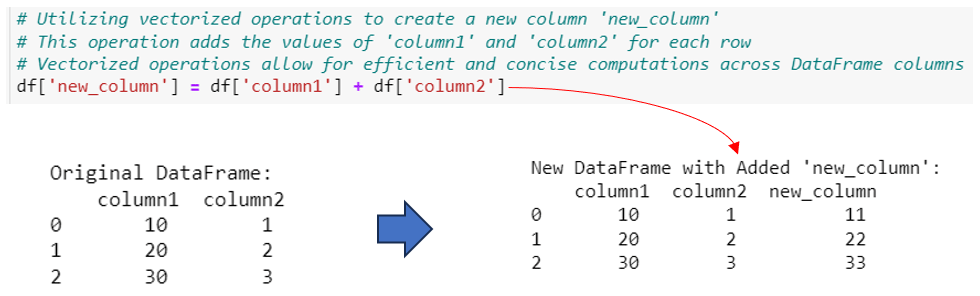
In this script:
- We have a DataFrame df with two numeric columns, ‘column1’ and ‘column2’.
- We then create a new column ‘new_column’ by adding ‘column1’ and ‘column2’ using a vectorized operation.
- The operation df[‘column1’] + df[‘column2’] is automatically applied to each corresponding element of the columns, resulting in a new series that is then assigned to ‘new_column’ in the DataFrame.
Advantages of Using Vectorized Operations:
- Performance: Vectorized operations are significantly faster than iterating through data using loops, especially with large datasets. This is due to the optimized nature of the underlying libraries (like NumPy and C extensions) that Pandas is built upon.
- Simplicity and Readability: Code using vectorized operations is often more concise and easier to read than traditional loop-based approaches.
- Compatibility with Pandas and NumPy: These operations seamlessly integrate with the Pandas library and can be used in conjunction with NumPy functions for more complex computations.
8. Streamlining Conditional Assignments with np.where in Pandas
Conditional assignments in Pandas can be efficiently handled using NumPy’s np.where function. This approach is particularly useful when you need to assign values in a new or existing column based on a condition evaluated for each row in the DataFrame. np.where offers a vectorized solution for such conditional logic, making it not only faster but also more readable compared to traditional looping methods.
Understanding np.where for Conditional Assignment:
The np.where function works similarly to an if-else statement. It takes a condition and two options: the first option (value_if_true) is used when the condition is true, and the second option (value_if_false) is used when the condition is false. This function is applied element-wise to the DataFrame.
Example of Using np.where:
Let’s demonstrate how np.where can be used in Pandas for conditional assignments:
import pandas as pd

import numpy as np


# Creating a sample DataFrame with a single numeric column

df = pd.DataFrame({

    'column': [10, 20, 30, 40, 50]

})


# Displaying the original DataFrame to show its initial state

# This DataFrame contains a series of numeric values in 'column'

print("Original DataFrame:\n", df)


# Setting a threshold value for conditional assignment

# Rows with 'column' values greater than this threshold will be labeled differently

threshold = 25


# Using np.where to create a new column 'new_column' in the DataFrame

# np.where applies a vectorized conditional operation

# If the condition (value in 'column' > threshold) is true, 'Above Threshold' is assigned

# If the condition is false, 'Below Threshold' is assigned

df['new_column'] = np.where(df['column'] > threshold, 'Above Threshold', 'Below Threshold')


# Displaying the updated DataFrame after applying the conditional assignment

# The new DataFrame includes the 'new_column' with labels based on the specified condition

print("New DataFrame with Conditional Assignment:\n", df, end="\n\n")
Output:

In this script:
- We start with a DataFrame df containing a single column ‘column’.
- We define a threshold value to use in our condition.
- np.where is used to create a new column ‘new_column’ in the DataFrame. For each row, if the value in ‘column’ is greater than the threshold, ‘Above Threshold’ is assigned to ‘new_column’; otherwise, ‘Below Threshold’ is assigned.
- The resulting DataFrame now includes this new column with values assigned based on the specified condition.
Advantages of Using np.where:
- Efficiency: np.where is a vectorized operation, making it much faster than applying conditional logic with loops.
- Clarity: The use of np.where often leads to more readable and concise code compared to traditional if-else statements within loops.
- Flexibility: It can handle not just simple conditions but also complex logical expressions, making it versatile for various data manipulation need
Conclusion
In the dynamic world of data analysis, the ability to efficiently manipulate data frames is key to unlocking insights from data. This comprehensive guide has explored various methods to assign values in Pandas DataFrames, each tailored to specific scenarios and requirements. From the simplicity of direct assignment to the precision of conditional assignment with loc and iloc, these techniques provide the foundational skills necessary for effective data manipulation.
We delved into the power of the apply function for applying complex logic across DataFrame axes and the utility of map and applymap for element-wise transformations. The assign method’s non-destructive nature offers a safe way to experiment with data transformations, while vectorized operations in Pandas optimize performance, enhancing both speed and code readability.
Furthermore, the use of np.where for streamlined conditional assignments highlights the synergy between Pandas and NumPy, showcasing how vectorized operations can simplify complex logical operations.
In summary, this guide serves as a valuable resource for anyone looking to deepen their understanding of data manipulation in Pandas. By mastering these diverse methods, you can confidently tackle a wide range of data transformation tasks, making your data analysis process more efficient, accurate, and insightful. Whether you’re a beginner or an experienced data analyst, these techniques are essential tools in your data manipulation toolkit, enabling you to transform raw data into meaningful insights.
 Software Technology