
Data manipulation and preparation is a critical step in data analysis and machine learning. One common task in this process is combining data from different sources, which often requires concatenation of DataFrames. Pandas, a powerful data manipulation library in Python, provides various methods for concatenating DataFrames. In this article, we will explore two primary techniques using pd.concat: row-wise and column-wise concatenation.
Using pd.concat for Row-wise Concatenation
Row-wise concatenation refers to appending DataFrames vertically, i.e., adding rows from one DataFrame under another. This method is particularly useful when you have data with the same columns but spread across different DataFrames.
Example-01:
import pandas as pd


# Creating two sample DataFrames

df1 = pd.DataFrame({'A': [1, 2], 'B': [3, 4]})

df2 = pd.DataFrame({'A': [5, 6], 'B': [7, 8]})


print("### df1 ###", "\n", df1, end="\n\n")

print("### df2 ###", "\n", df2, end="\n\n")


# Concatenating DataFrames row-wise

df_row_concatenated = pd.concat([df1, df2], ignore_index=True)

print("### df_row_concatenated ###", "\n", df_row_concatenated)
Output-01:
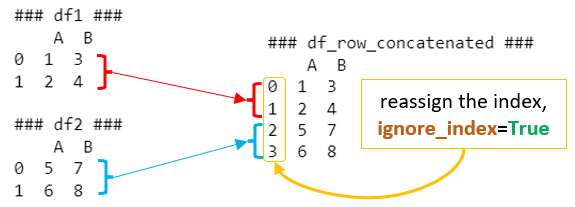
In this example, df1 and df2 are concatenated row-wise, resulting in df_row_concatenated. The ignore_index=True parameter is used to reassign the index in the concatenated DataFrame. Without it, the index would retain its original values from df1 and df2, which might not be desirable in all cases.
Using pd.concat for Column-wise Concatenation
Column-wise concatenation is about appending DataFrames horizontally, i.e., adding columns from one DataFrame to another. This is typically used when you have different sets of information about the same observations and need to bring them together.
Example-02:
import pandas as pd


# Creating two sample DataFrames with the same index

df3 = pd.DataFrame({'C': [9, 10], 'D': [11, 12]}, index=[0, 1])

df4 = pd.DataFrame({'E': [13, 14], 'F': [15, 16]}, index=[0, 1])


print("### df3 ###", "\n", df3, end="\n\n")

print("### df4 ###", "\n", df4, end="\n\n")


# Concatenating DataFrames column-wise

df_column_concatenated = pd.concat([df3, df4], axis=1)

print("### df_column_concatenated ###", "\n", df_column_concatenated)
Output-02:

Here, df3 and df4 are concatenated column-wise, resulting in df_column_concatenated. The axis=1 parameter is crucial as it specifies the axis along which the concatenation should happen (axis=0 for rows and axis=1 for columns). It’s important to ensure that the DataFrames have the same index for meaningful results in column-wise concatenation.
Column-wise concatenation in Pandas is straightforward when the DataFrames share the same index. However, when the indexes are not aligned, Pandas still performs the concatenation but fills in missing values with NaNs. This situation often arises when combining datasets that don’t have a perfect one-to-one correspondence between their rows.
Let’s explore this with an example:
Example with Mismatched Indexes
Suppose we have two DataFrames, df1 and df2, with different indexes:
Example-03:
import pandas as pd


# Creating two sample DataFrames with different indexes

df1 = pd.DataFrame({'A': [1, 2], 'B': [3, 4]}, index=[0, 1])

df2 = pd.DataFrame({'C': [5, 6], 'D': [7, 8]}, index=[1, 2])


print("### df1 ###", "\n", df1, end="\n\n")

print("### df2 ###", "\n", df2, end="\n\n")


# Concatenating DataFrames column-wise

df_column_concatenated = pd.concat([df1, df2], axis=1)

print("### df_column_concatenated ###", "\n", df_column_concatenated)
Output-03:
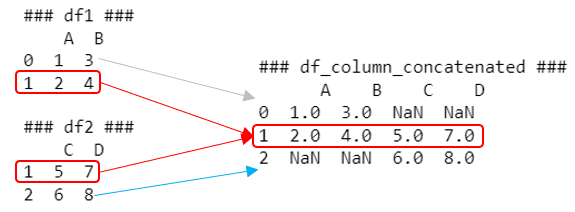
In this scenario, df1 has an index of [0, 1], while df2 has an index of [1, 2]. When we concatenate these DataFrames column-wise, the resulting DataFrame df_column_concatenated looks like this:
Understanding the Result:
- For index 0, only df1 has data, so the columns from df2 (C and D) are filled with NaN.
- For index 1, both df1 and df2 have data, so all columns (A, B, C, D) have values.
- For index 2, only df2 has data, so the columns from df1 (A and B) are filled with NaN.
Handling Mismatched Indexes
When dealing with mismatched indexes, you have a few options:
- Reindexing before Concatenation: You can reindex one or both DataFrames to have matching indexes. This could mean adding missing rows (filled with NaNs) or aligning to a common set of indexes.
- Filling NaN Values: After concatenation, you can fill NaN values using methods like fillna(), if appropriate for your data.
- Using Outer Join: By default, pd.concat uses an outer join, which includes all indexes from both DataFrames. You can also use an inner join (join=’inner’) to keep only the indexes that are present in both DataFrames.
- Resetting Indexes: If the index itself is not meaningful, you might reset the index in both DataFrames before concatenation.
Each approach has its use cases, depending on the nature of your data and the requirements of your analysis.
Conclusion
Understanding how to concatenate DataFrames effectively is a fundamental skill in data manipulation with Pandas. Whether you’re appending rows or columns, pd.concat offers a flexible and powerful way to combine data from multiple sources into a single DataFrame. By mastering these techniques, you can streamline your data preprocessing and analysis workflow, making it more efficient and robust.
 Software Technology