In this article, we delve into the versatile world of the Pandas merge function, an indispensable tool for Python data enthusiasts. As we navigate the nuances of merging DataFrames using both single and multiple keys, we’ll also explore various join techniques, including inner, left, right, and outer joins, as well as index-based merging. To aid in your understanding, we’ll reference a helpful diagram that visually captures the essence of these join types, providing a clearer picture of how each merge operation works. This exploration is designed to equip you with the essential skills needed for effective data amalgamation and analysis. Here’s the diagram:
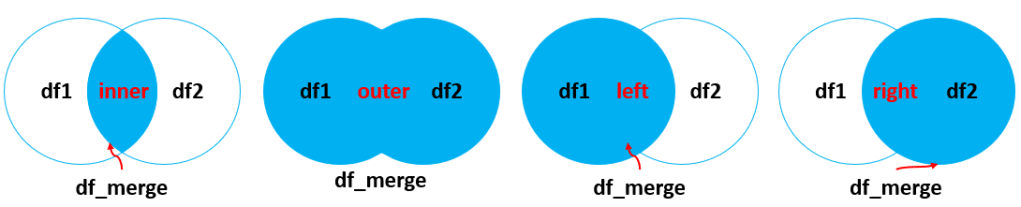
This visual representation will help you grasp the different ways in which DataFrames can be combined, making it easier to understand the practical applications of each merge type. Let’s dive in and discover the power of merging in Pandas!
To effectively showcase the range of merge operations in Pandas, encompassing left, right, inner, and outer joins with both single and multiple keys, we will delve into a series of detailed scripts. Each script utilizes two carefully designed dummy DataFrames, structured to simulate typical scenarios where such merging techniques are invaluable. This practical approach offers a tangible context for each example, clearly demonstrating how these diverse merging strategies can be adeptly applied to real-world data challenges. Let’s dive into these scripts and explore the power of Pandas in data merging:
Inner Merge with a Single Key
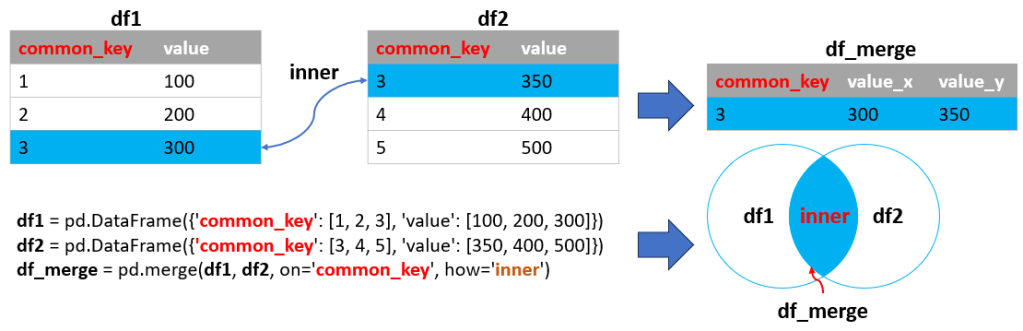
The inner merge is the default merge operation in Pandas. It combines rows from two DataFrames based on a common key, retaining only the rows that have matching values in both DataFrames.
Example-01:
import pandas as pd

# DataFrames with a common key
df1 = pd.DataFrame({'common_key': [1, 2, 3], 'value': [100, 200, 300]})
df2 = pd.DataFrame({'common_key': [3, 4, 5], 'value': [350, 400, 500]})

# Performing an inner merge
df_merge = pd.merge(df1, df2, on='common_key', how='inner')

# Displaying the DataFrames and the merged result
print(df1, end="\n\n")
print(df2, end="\n\n")
print(df_merge)Output:
Inner Merge with Mismatched Key Names
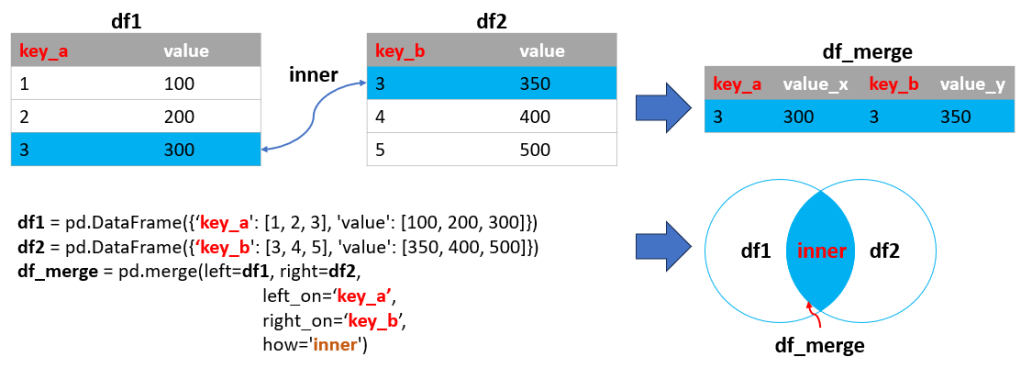
Sometimes, the columns you wish to merge on have different names in each DataFrame. Pandas allows you to specify which columns to use as the merge keys.
Example-02:
import pandas as pd

# DataFrames with different key names
df1 = pd.DataFrame({'key_a': [1, 2, 3], 'value': [100, 200, 300]})
df2 = pd.DataFrame({'key_b': [3, 4, 5], 'value': [350, 400, 500]})

# Performing an inner merge with mismatched key names
df_merge = pd.merge(left=df1, right=df2, left_on='key_a', right_on='key_b', how='inner')

# Displaying the results
print(df1, end="\n\n")
print(df2, end="\n\n")
print(df_merge)Output:
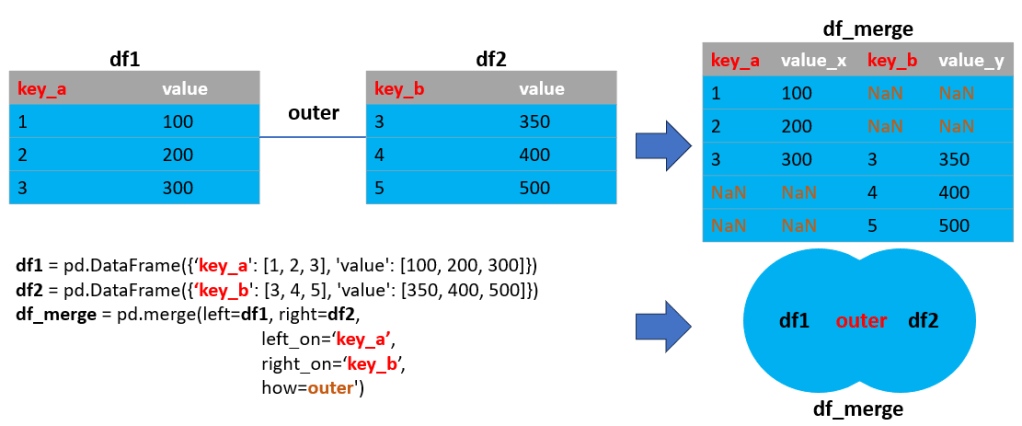
Outer Merge with a Single Key
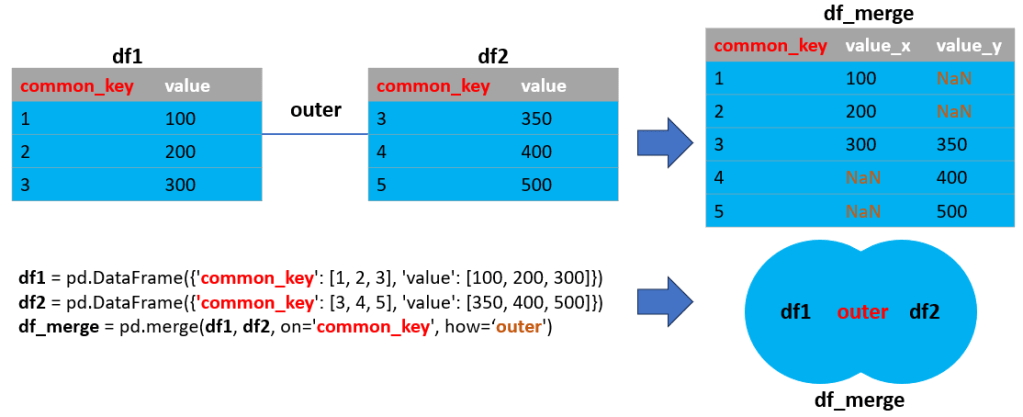
An outer merge combines all rows from both DataFrames, filling in NaNs for missing matches. It’s useful for identifying missing data across datasets.
Example-03:
import pandas as pd

# DataFrames with a common key
df1 = pd.DataFrame({'common_key': [1, 2, 3], 'value': [100, 200, 300]})
df2 = pd.DataFrame({'common_key': [3, 4, 5], 'value': [350, 400, 500]})

# Performing an outer merge
df_merge = pd.merge(df1, df2, on='common_key', how='outer')

# Displaying the results
print(df1, end="\n\n")
print(df2, end="\n\n")
print(df_merge)Output:
Outer Merge with Mismatched Key Names
This is similar to Example-02 but uses an outer join, ensuring all data from both DataFrames is included.
Example-04:
import pandas as pd

# DataFrames with different key names
df1 = pd.DataFrame({'key_a': [1, 2, 3], 'value': [100, 200, 300]})
df2 = pd.DataFrame({'key_b': [3, 4, 5], 'value': [350, 400, 500]})

# Performing an outer merge with mismatched key names
df_merge = pd.merge(left=df1, right=df2, left_on='key_a', right_on='key_b', how='outer')

# Displaying the results
print(df1, end="\n\n")
print(df2, end="\n\n")
print(df_merge)Output:
Example-05-16: Exploring Left, Right, and Multiple Key Merges
In examples 5 through 16, we explore the intricacies of left, right, and multiple key merges in Pandas. Each of these merge types caters to specific data combination requirements. Left and right merges excel in enriching or filtering datasets by aligning them with another dataset. On the other hand, merges involving multiple keys facilitate handling more complex conditions, allowing for data combination across multiple columns.
Each of these examples adheres to a structure similar to the earlier ones, with variations in the ‘how‘ parameter and the keys used for merging. These scripts are designed to showcase the adaptability of Pandas’ merge function, underscoring its vital role in data analysis. To get a comprehensive understanding and see these merge functions in action, let’s proceed to the detailed example scripts (5-16) provided below:
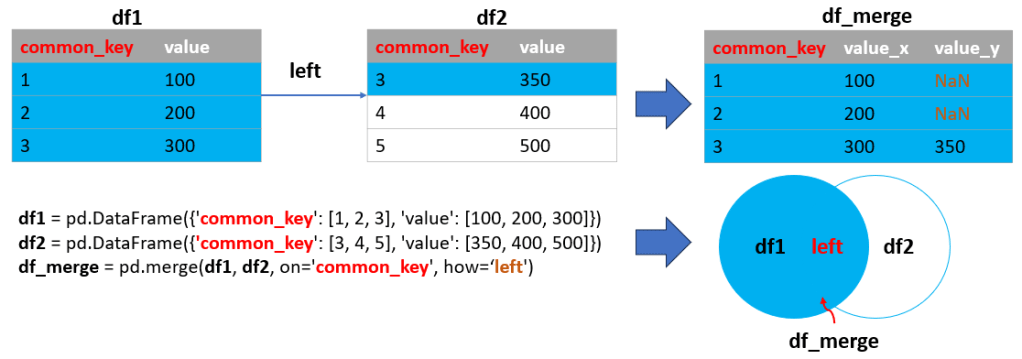
Left Merge with a Single Key
A left merge includes all rows from the left DataFrame and the matched rows from the right DataFrame. Rows in the left DataFrame without a match in the right DataFrame will have NaNs for the right DataFrame’s columns.
Example-05:
import pandas as pd

# DataFrames with a common key
df1 = pd.DataFrame({'common_key': [1, 2, 3], 'value': [100, 200, 300]})
df2 = pd.DataFrame({'common_key': [3, 4, 5], 'value': [350, 400, 500]})

# Performing a left merge
df_merge = pd.merge(df1, df2, on='common_key', how='left')

# Displaying the results
print(df1, end="\n\n")
print(df2, end="\n\n")
print(df_merge)Output:
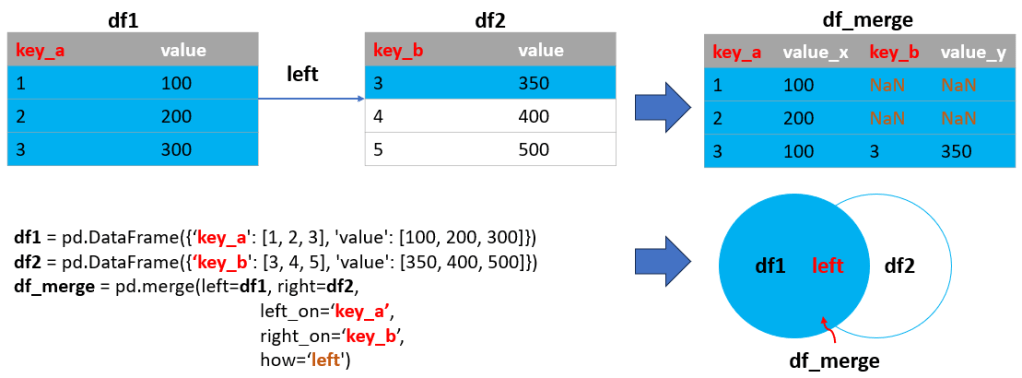
Left Merge with Mismatched Key Names
This is similar to Example-05 but with different key names in each DataFrame.
Example-06:
import pandas as pd

# DataFrames with different key names
df1 = pd.DataFrame({'key_a': [1, 2, 3], 'value': [100, 200, 300]})
df2 = pd.DataFrame({'key_b': [3, 4, 5], 'value': [350, 400, 500]})

# Performing a left merge with mismatched key names
df_merge = pd.merge(left=df1, right=df2, left_on='key_a', right_on='key_b', how='left')

# Displaying the results
print(df1, end="\n\n")
print(df2, end="\n\n")
print(df_merge)Output:
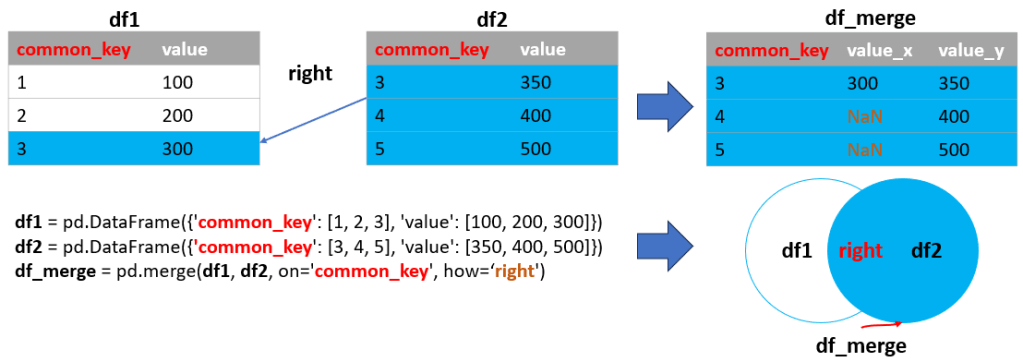
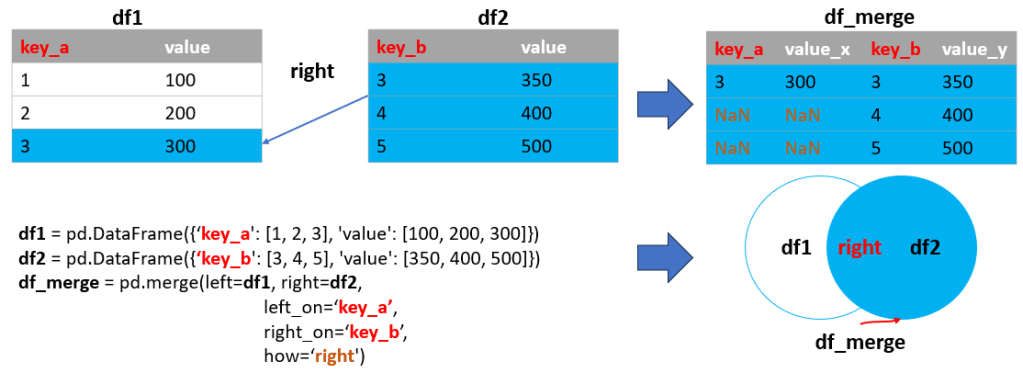
Right Merge with a Single Key
A right merge includes all rows from the right DataFrame and the matched rows from the left DataFrame. Rows in the right DataFrame without a match in the left DataFrame will have NaNs for the left DataFrame’s columns.
Example-07:
import pandas as pd

# DataFrames with a common key
df1 = pd.DataFrame({'common_key': [1, 2, 3], 'value': [100, 200, 300]})
df2 = pd.DataFrame({'common_key': [3, 4, 5], 'value': [350, 400, 500]})

# Performing a right merge
df_merge = pd.merge(df1, df2, on='common_key', how='right')

# Displaying the results
print(df1, end="\n\n")
print(df2, end="\n\n")
print(df_merge)Output:
Right Merge with Mismatched Key Names
This script demonstrates a right merge where the DataFrames have different key names. Example-08:
import pandas as pd

# DataFrames with different key names
df1 = pd.DataFrame({'key_a': [1, 2, 3], 'value': [100, 200, 300]})
df2 = pd.DataFrame({'key_b': [3, 4, 5], 'value': [350, 400, 500]})

# Performing a right merge with mismatched key names
df_merge = pd.merge(left=df1, right=df2, left_on='key_a', right_on='key_b', how='right')

# Displaying the results
print(df1, end="\n\n")
print(df2, end="\n\n")
print(df_merge)Output:
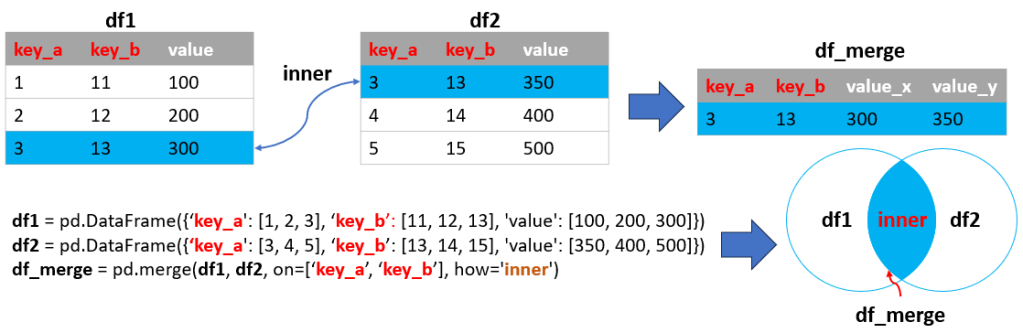
Inner Merge with Multiple Keys
An inner merge with multiple keys combines rows that have matching values in all specified keys from both DataFrames.
Example-09:
import pandas as pd

# DataFrames with multiple keys
df1 = pd.DataFrame({'key_a': [1, 2, 3], 'key_b': [11, 12, 13], 'value': [100, 200, 300]})
df2 = pd.DataFrame({'key_a': [3, 4, 5], 'key_b': [13, 14, 15], 'value': [350, 400, 500]})

# Performing an inner merge with multiple keys
df_merge = pd.merge(df1, df2, on=['key_a', 'key_b'], how='inner')

# Displaying the results
print(df1, end="\n\n")
print(df2, end="\n\n")
print(df_merge)Output:
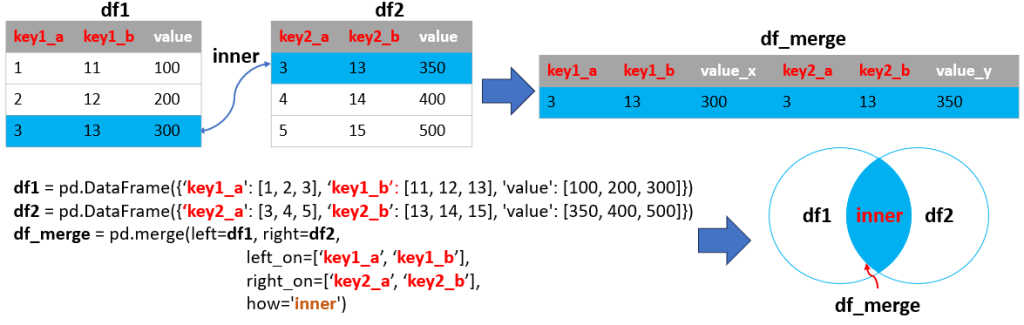
Inner Merge with Mismatched Multiple Keys
This script demonstrates an inner merge where each DataFrame has different key names, but they represent the same logical keys.
Example-10:
import pandas as pd

# DataFrames with mismatched multiple keys
df1 = pd.DataFrame({'key1_a': [1, 2, 3], 'key1_b': [11, 12, 13], 'value': [100, 200, 300]})
df2 = pd.DataFrame({'key2_a': [3, 4, 5], 'key2_b': [13, 14, 15], 'value': [350, 400, 500]})

# Performing an inner merge with mismatched multiple keys
df_merge = pd.merge(left=df1, right=df2, left_on=['key1_a', 'key1_b'], right_on=['key2_a', 'key2_b'], how='inner')

# Displaying the results
print(df1, end="\n\n")
print(df2, end="\n\n")
print(df_merge)Output:
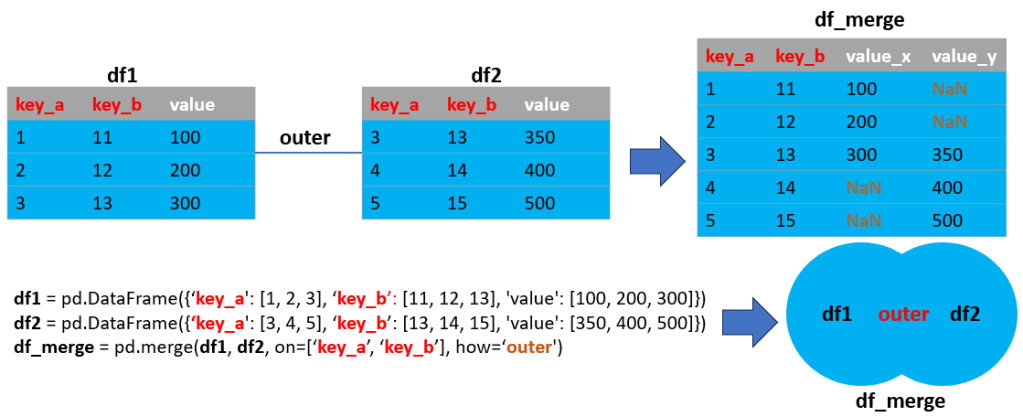
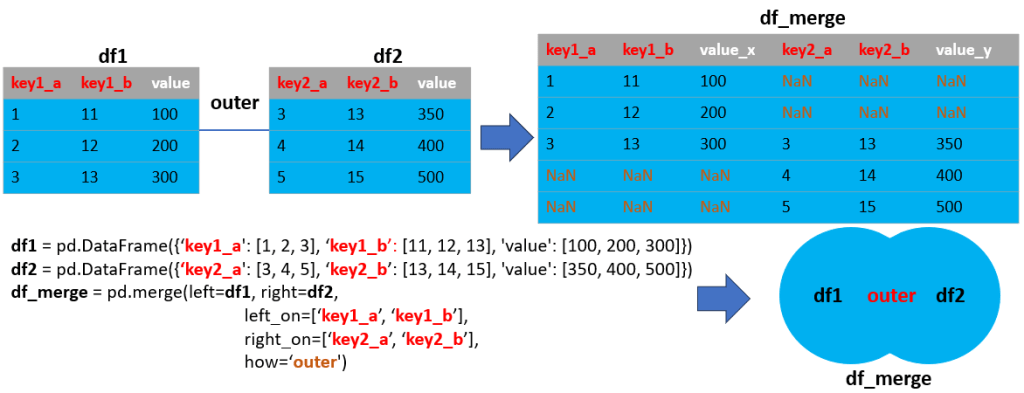
Outer Merge with Multiple Keys
An outer merge with multiple keys combines all rows from both DataFrames, filling in NaNs where there are no matches.
Example-11:
import pandas as pd

# DataFrames with multiple keys
df1 = pd.DataFrame({'key_a': [1, 2, 3], 'key_b': [11, 12, 13], 'value': [100, 200, 300]})
df2 = pd.DataFrame({'key_a': [3, 4, 5], 'key_b': [13, 14, 15], 'value': [350, 400, 500]})

# Performing an outer merge with multiple keys
df_merge = pd.merge(df1, df2, on=['key_a', 'key_b'], how='outer')

# Displaying the results
print(df1, end="\n\n")
print(df2, end="\n\n")
print(df_merge)Output:
Outer Merge with Mismatched Multiple Keys
This script shows an outer merge where the DataFrames have different key names but need to be combined based on these keys.
Example-12:
import pandas as pd

# DataFrames with mismatched multiple keys
df1 = pd.DataFrame({'key1_a': [1, 2, 3], 'key1_b': [11, 12, 13], 'value': [100, 200, 300]})
df2 = pd.DataFrame({'key2_a': [3, 4, 5], 'key2_b': [13, 14, 15], 'value': [350, 400, 500]})

# Performing an outer merge with mismatched multiple keys
df_merge = pd.merge(left=df1, right=df2, left_on=['key1_a', 'key1_b'], right_on=['key2_a', 'key2_b'], how='outer')

# Displaying the results
print(df1, end="\n\n")
print(df2, end="\n\n")
print(df_merge)Output:
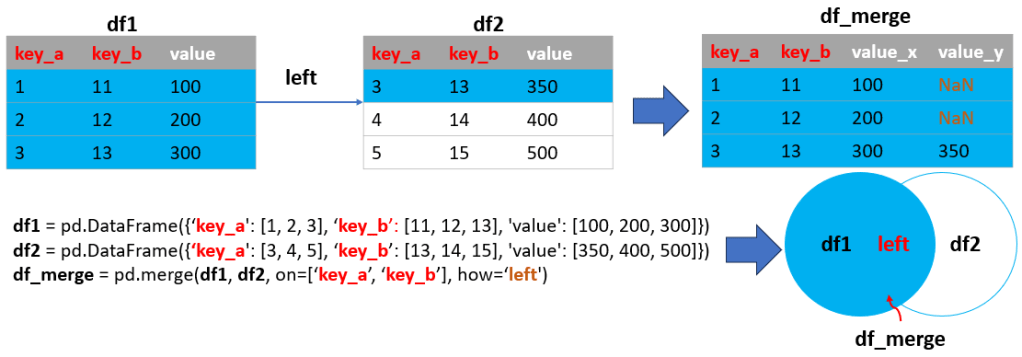
Left Merge with Multiple Keys
A left merge with multiple keys includes all rows from the left DataFrame and matched rows from the right DataFrame, with NaNs for unmatched rows.
Example-13:
import pandas as pd

# DataFrames with multiple keys
df1 = pd.DataFrame({'key_a': [1, 2, 3], 'key_b': [11, 12, 13], 'value': [100, 200, 300]})
df2 = pd.DataFrame({'key_a': [3, 4, 5], 'key_b': [13, 14, 15], 'value': [350, 400, 500]})

# Performing a left merge with multiple keys
df_merge = pd.merge(df1, df2, on=['key_a', 'key_b'], how='left')

# Displaying the results
print(df1, end="\n\n")
print(df2, end="\n\n")
print(df_merge)Output:
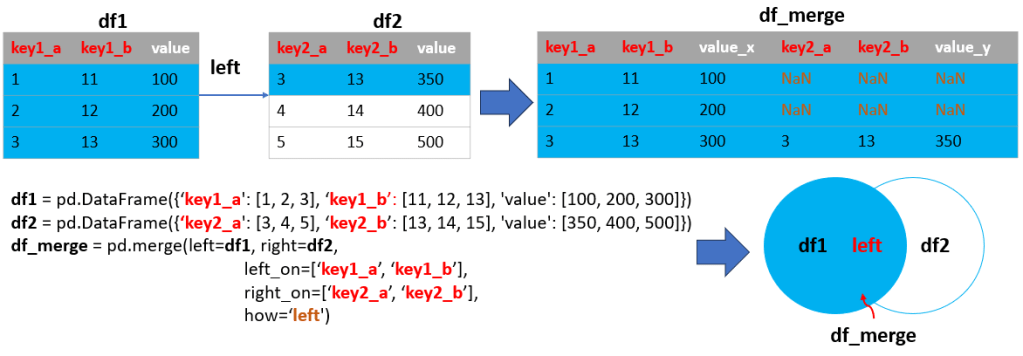
Left Merge with Mismatched Multiple Keys
This script demonstrates a left merge with multiple keys that have different names in each DataFrame.
Example-14:
import pandas as pd

# DataFrames with mismatched multiple keys
df1 = pd.DataFrame({'key1_a': [1, 2, 3], 'key1_b': [11, 12, 13], 'value': [100, 200, 300]})
df2 = pd.DataFrame({'key2_a': [3, 4, 5], 'key2_b': [13, 14, 15], 'value': [350, 400, 500]})

# Performing a left merge with mismatched multiple keys
df_merge = pd.merge(left=df1, right=df2, left_on=['key1_a', 'key1_b'], right_on=['key2_a', 'key2_b'], how='left')

# Displaying the results
print(df1, end="\n\n")
print(df2, end="\n\n")
print(df_merge)Output:
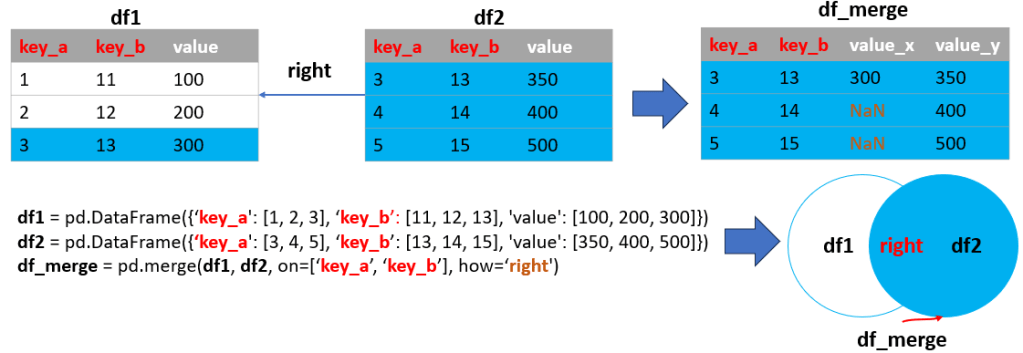
Right Merge with Multiple Keys
A right merge with multiple keys includes all rows from the right DataFrame and matched rows from the left DataFrame, with NaNs for unmatched rows.
Example-15:
import pandas as pd

# DataFrames with multiple keys
df1 = pd.DataFrame({'key_a': [1, 2, 3], 'key_b': [11, 12, 13], 'value': [100, 200, 300]})
df2 = pd.DataFrame({'key_a': [3, 4, 5], 'key_b': [13, 14, 15], 'value': [350, 400, 500]})

# Performing a right merge with multiple keys
df_merge = pd.merge(df1, df2, on=['key_a', 'key_b'], how='right')

# Displaying the results
print(df1, end="\n\n")
print(df2, end="\n\n")
print(df_merge)Output:
Right Merge with Mismatched Multiple Keys
This script shows a right merge where the DataFrames have different key names but need to be combined based on these keys.
Example-16:
import pandas as pd

# DataFrames with mismatched multiple keys
df1 = pd.DataFrame({'key1_a': [1, 2, 3], 'key1_b': [11, 12, 13], 'value': [100, 200, 300]})
df2 = pd.DataFrame({'key2_a': [3, 4, 5], 'key2_b': [13, 14, 15], 'value': [350, 400, 500]})

# Performing a right merge with mismatched multiple keys
df_merge = pd.merge(left=df1, right=df2, left_on=['key1_a', 'key1_b'], right_on=['key2_a', 'key2_b'], how='right')

# Displaying the results
print(df1, end="\n\n")
print(df2, end="\n\n")
print(df_merge)Output:
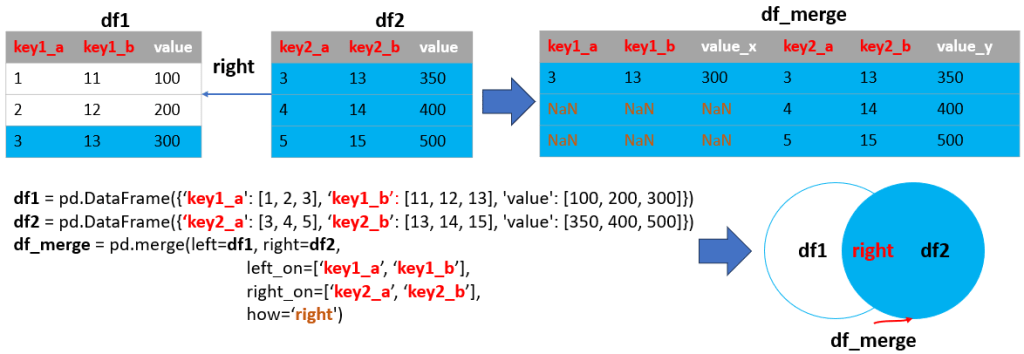
After delving into merges based on single or multiple keys, it’s crucial to understand how Pandas can efficiently handle merges using DataFrame indexes. This approach is especially beneficial in scenarios like time series analysis or when working with data where the index itself carries important information or a specific order that needs to be preserved during merging.
In the following scripts, we will demonstrate how to perform inner, outer, left, and right merges using DataFrame indexes. These examples will provide you with insights into how index-based merging works and how you can apply it to your data manipulation tasks in Python.
Let’s explore these additional scripts to gain a complete understanding of the diverse merging capabilities Pandas offers, ensuring you’re well-equipped to tackle a wide range of data merging scenarios.
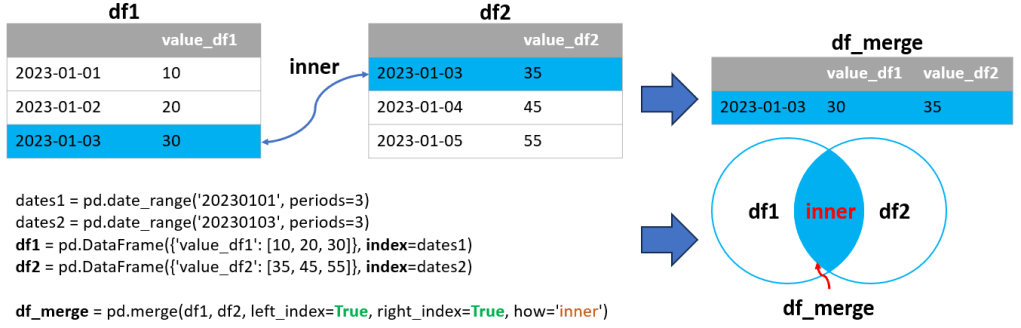
Inner Merge on Index (Time Series)
An inner merge based on indexes combines only the rows with matching index values (dates in this case) in both DataFrames.
Example-17:
import pandas as pd

# Creating sample time series DataFrames
dates1 = pd.date_range('20230101', periods=3)
dates2 = pd.date_range('20230103', periods=3)
df1 = pd.DataFrame({'value_df1': [10, 20, 30]}, index=dates1)
df2 = pd.DataFrame({'value_df2': [35, 45, 55]}, index=dates2)

# Performing an inner merge on index
df_merge = pd.merge(df1, df2, left_index=True, right_index=True, how='inner')

print(df1, end="\n\n")
print(df2, end="\n\n")
print(df_merge)Output:
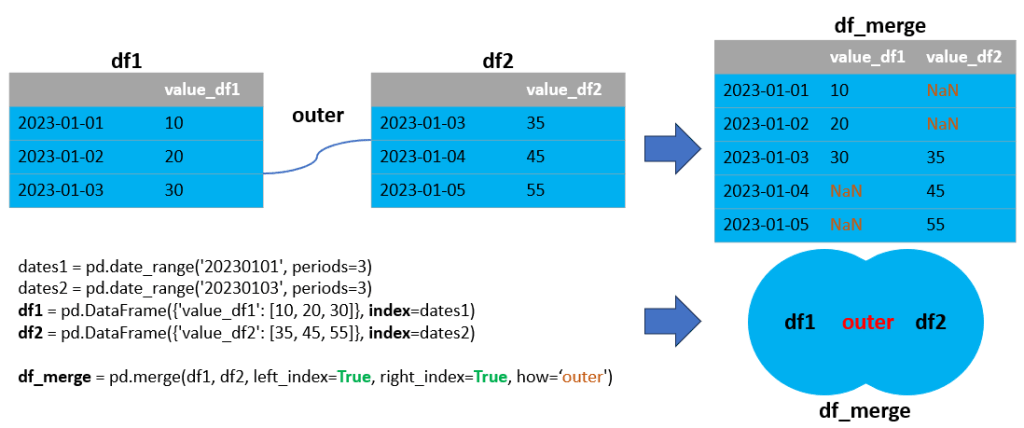
Outer Merge on Index (Time Series)
An outer merge based on indexes combines all rows from both DataFrames, filling in NaNs where there are no matching index values.
Example-18:
import pandas as pd

# Creating sample time series DataFrames
dates1 = pd.date_range('20230101', periods=3)
dates2 = pd.date_range('20230103', periods=3)
df1 = pd.DataFrame({'value_df1': [10, 20, 30]}, index=dates1)
df2 = pd.DataFrame({'value_df2': [35, 45, 55]}, index=dates2)

# Performing an outer merge on index
df_merge = pd.merge(df1, df2, left_index=True, right_index=True, how='outer')

print(df1, end="\n\n")
print(df2, end="\n\n")
print(df_merge)Output:
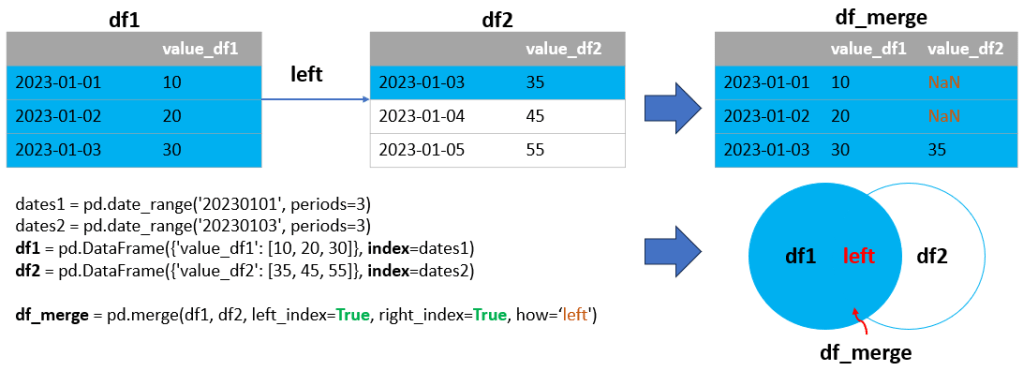
Left Merge on Index (Time Series)
A left merge based on indexes includes all rows from the left DataFrame and the matched rows from the right DataFrame.
Example-19:
import pandas as pd

# Creating sample time series DataFrames
dates1 = pd.date_range('20230101', periods=3)
dates2 = pd.date_range('20230103', periods=3)
df1 = pd.DataFrame({'value_df1': [10, 20, 30]}, index=dates1)
df2 = pd.DataFrame({'value_df2': [35, 45, 55]}, index=dates2)

# Performing an outer merge on index
df_merge = pd.merge(df1, df2, left_index=True, right_index=True, how='left')

print(df1, end="\n\n")
print(df2, end="\n\n")
print(df_merge)Output:
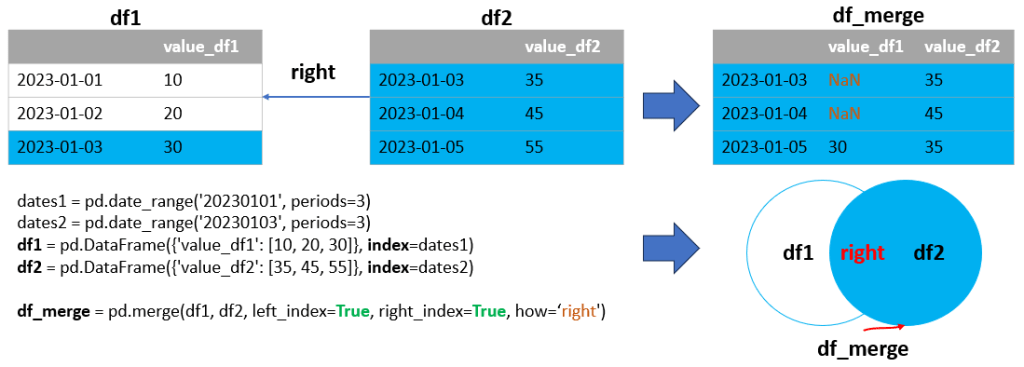
Right Merge on Index (Time Series)
A right merge based on indexes includes all rows from the right DataFrame and the matched rows from the left DataFrame.
Example-20:
import pandas as pd

# Creating sample time series DataFrames
dates1 = pd.date_range('20230101', periods=3)
dates2 = pd.date_range('20230103', periods=3)
df1 = pd.DataFrame({'value_df1': [10, 20, 30]}, index=dates1)
df2 = pd.DataFrame({'value_df2': [35, 45, 55]}, index=dates2)

# Performing an outer merge on index
df_merge = pd.merge(df1, df2, left_index=True, right_index=True, how='right')

print(df1, end="\n\n")
print(df2, end="\n\n")
print(df_merge)Output:
Conclusion
In our comprehensive exploration of Pandas’ merge function, we’ve delved into its remarkable flexibility and robustness, addressing a wide array of data merging scenarios. From the simplicity of single-key merges to the complexity of multi-key and index-based combinations, these examples highlight how Pandas is an indispensable tool for effective data integration and analysis, particularly in time series data. This exploration equips data professionals with the skills to excel in Python-based data analysis, enabling precise and efficient insights from both simple and complex datasets. The ability to align data based on time indexes opens up avenues for in-depth analyses in various fields, including financial analysis and environmental monitoring, making the merge function a key asset in any data analyst’s toolkit.
 Software Technology