The error message “IntCastingNaNError: Cannot convert non-finite values (NA or inf) to integer” arises when attempting to cast non-finite values, such as NaN (Not a Number) or infinity (inf), to an integer data type.
Here the breakdown of the error:
- IntCastingNaNError indicating an issue with casting to an integer.
- Cannot convert non-finite values (NA or inf) to integer: This is the description of the error. It tells you that there’s an attempt to convert values that are either NA (similar to NaN) or infinity to an integer, which is not allowed.
Here the script to generate the error:
import pandas as pd
import numpy as np

data = {
    'KPI': ['Avialability', 'Accessibility', 'DCR', 'RI2'],
    'Value': [99.97, 83.8, np.nan, 22.33],
}

df = pd.DataFrame(data)
df['Value'] = df['Value'].astype(int)

df
Above script will result in “IntCastingNaNError” because can’t convert Nan value to integer:

Here how to handle it:
- Replace NaN values, before converting to integer, you can replace NaN values with a specific value:
import pandas as pd
import numpy as np

data = {
    'KPI': ['Avialability', 'Accessibility', 'DCR', 'RI2'],
    'Value': [99.97, 83.8, np.nan, 22.33],
}

df = pd.DataFrame(data)
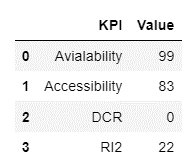
df.fillna(0, inplace=True)
df['Value'] = df['Value'].astype(int)

df
Here the result from script above:
2. Drop NaN values, before converting to integer, you can drop NaN values:
import pandas as pd
import numpy as np

data = {
    'KPI': ['Avialability', 'Accessibility', 'DCR', 'RI2'],
    'Value': [99.97, 83.8, np.nan, 22.33],
}

df = pd.DataFrame(data)
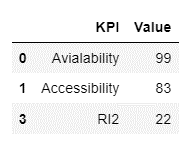
df.dropna(inplace=True)
df['Value'] = df['Value'].astype(int)

df
Here the result from script above:
 Software Technology