When working with dates in Excel, it’s common to encounter data inconsistencies such as #N/A, 1/0/1900, or blank values in the ‘date’ column. Converting such columns to datetime format can be challenging, and it may lead to errors or unexpected results.
For example, in the code provided below, an error occurs when attempting to convert the ‘CO_Date’ column to datetime format using the pd.to_datetime() method. This is because the ‘CO_Date’ column does not have a uniform format as defined in the pd.to_datetime() format (%Y-%m-%d %H:%M:%S). The details of this error can be seen in the picture below:

To handle the errors mentioned earlier, we need to use the pd.to_datetime() method with appropriate parameters. The necessary parameters for this are the date, format, and errors parameters. By setting the format parameter to the valid date format in the column, we can parse the dates correctly. Additionally, setting the errors parameter to ‘coerce’ allows us to replace any invalid or missing dates with ‘NaT’ (Not a Time) values instead of raising errors. Therefore, the appropriate parameter combination for the pd.to_datetime() method in this case is ‘date’, ‘format’, and ‘errors’.
Here’s an example of how you can do it:
import pandas as pd

xlsx = r"C:\ec.xlsx"

df = pd.read_excel(xlsx, sheet_name="Sheet1", header=0)
df['CO_Date'] = pd.to_datetime(df['CO_Date'], format='%Y-%m-%d %H:%M:%S', errors='coerce')
df = df[(df['CO_Date'] > '2022-01-01')].copy()

print(df)
The result:
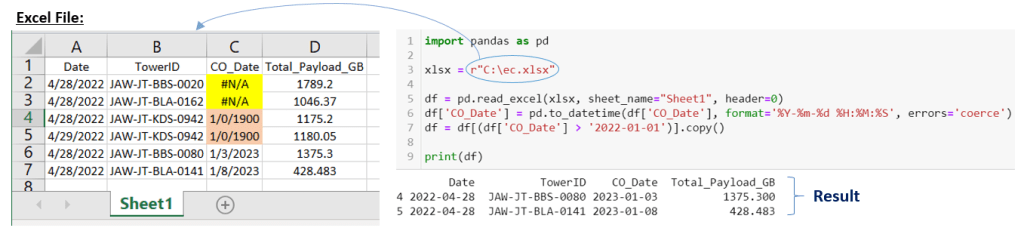
In this example, we have a ‘CO_Date’ column that contains various date formats, including #N/A, 1/0/1900, blank strings, and valid dates in the format of ‘%m/%d/%Y’ (Excel file format). However, when the DataFrame is printed in Python, the date format of the ‘CO_Date’ column is ‘%Y-%m-%d %H:%M:%S’. This is because Python uses the default date format when printing a DataFrame, which is different from the original format of the Excel file.
To convert the ‘CO_Date’ column to datetime format, we use the pd.to_datetime() method and set the format parameter to ‘%Y-%m-%d %H:%M:%S’ to match the valid dates in the column. We also set the errors parameter to ‘coerce’ to replace any invalid dates with ‘NaT’ (Not a Time) instead of raising an error.
After converting the column to datetime format, you can proceed to handle the ‘NaT’ values based on your use case. For example, you can fill the missing values using the fillna() method or drop them using the dropna() method.
 Software Technology