To use the .str.split() function in pandas DataFrame, you can refer to this link:
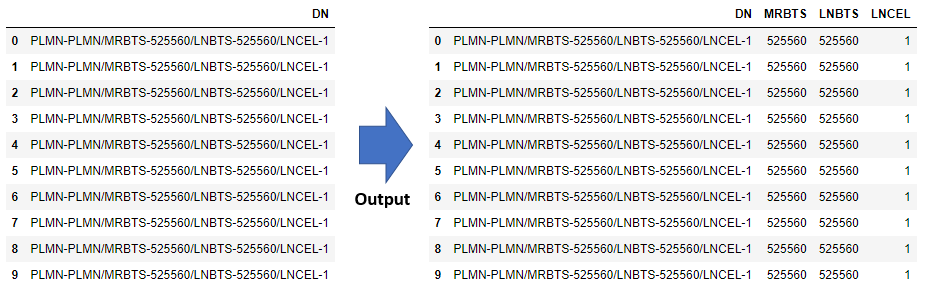
But in this article, we’ll use regex to split the sting values and change them to multiple columns. Let’s see the sample:
Example:
- Create 1 column pandas DataFrame (DN)
- Split DN column into multiple columns (first, MRBTS, LNBTS, LNCEL, last) by .str.split() function with regex (\d+) mean take integer value and put it on the MRBTS, LNBTS, and LNCEL columns. By the way, the first and last columns are the part of delimiter and the value will be blank
- Drop the first and last columns
Script:
import pandas as pd

df = pd.DataFrame({
    'DN': ["PLMN-PLMN/MRBTS-525560/LNBTS-525560/LNCEL-1", "PLMN-PLMN/MRBTS-525560/LNBTS-525560/LNCEL-1",
           "PLMN-PLMN/MRBTS-525560/LNBTS-525560/LNCEL-1", "PLMN-PLMN/MRBTS-525560/LNBTS-525560/LNCEL-1",
           "PLMN-PLMN/MRBTS-525560/LNBTS-525560/LNCEL-1", "PLMN-PLMN/MRBTS-525560/LNBTS-525560/LNCEL-1",
           "PLMN-PLMN/MRBTS-525560/LNBTS-525560/LNCEL-1", "PLMN-PLMN/MRBTS-525560/LNBTS-525560/LNCEL-1",
           "PLMN-PLMN/MRBTS-525560/LNBTS-525560/LNCEL-1", "PLMN-PLMN/MRBTS-525560/LNBTS-525560/LNCEL-1"]
})

df[['first', 'MRBTS', 'LNBTS', 'LNCEL', 'last']] = df['DN'].str.split(r'PLMN-PLMN/MRBTS-(\d+)/LNBTS-(\d+)/LNCEL-(\d+)', expand=True)

df.drop(['first', 'last'], axis=1, inplace=True)

df
Output:
Summary
The best part of using regex when you want to split a column into multiple columns is the simplicity, the process is shorter compared to the trick below:
 Software Technology