You can use split() method to split a pandas DataFrame text column into multiple columns.
Syntax:
str.split(separator, maxsplit, expand=False)Parameters:
- separator (optional): Delimiter at which splits occur. If not provided, the string is split at whitespaces.
- maxsplit (optional): Maximum number of splits. If not provided, there is no limit on the number of splits.
- expand (optional): Default False. Expand the split strings into separate columns. If True, return DataFrame/MultiIndex expanding dimensionality. If False, return Series/Index, containing lists of strings.
Returns: The split() method returns a list of strings.
The example below will split A column into two columns X and Y by expanding DataFrame dimensionality:
#split column A into two columns: column X and column Y
df[['X', 'Y']] = df['A'].str.split(',', 1, expand=True)
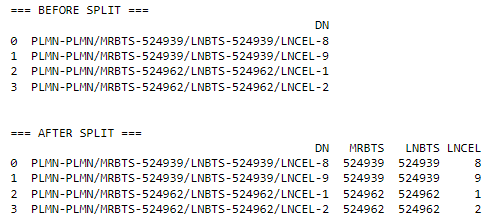
Example:
import pandas as pd

df = pd.DataFrame({'DN': ['PLMN-PLMN/MRBTS-524939/LNBTS-524939/LNCEL-8', 'PLMN-PLMN/MRBTS-524939/LNBTS-524939/LNCEL-9',
                          'PLMN-PLMN/MRBTS-524962/LNBTS-524962/LNCEL-1', 'PLMN-PLMN/MRBTS-524962/LNBTS-524962/LNCEL-2']})

print("=== BEFORE SPLIT ===")
print(df, end='\n\n\n')

df[['PLMN', 'MRBTS', 'LNBTS', 'LNCEL']] = df['DN'].str.split('/', 3, expand = True)

df.drop('PLMN', axis=1, inplace=True)
df['MRBTS'] = df['MRBTS'].str[6:]
df['LNBTS'] = df['LNBTS'].str[6:]
df['LNCEL'] = df['LNCEL'].str[6:]

print("=== AFTER SPLIT ===")
print(df)
Output:
 Software Technology