
Python slicing is a very powerful way to access parts of your data, so it’s one aspect of the language that every Python programmer needs to know. But first, you need to know the difference between indexing and slicing:
Indexing
Index position works as a pointer to an item of your iterable object or data (such as string, list, and tuple) so you have access to your data. And remember, Indexing will return an item, not a list. let’s look at the picture below to explain this concept more clearly:
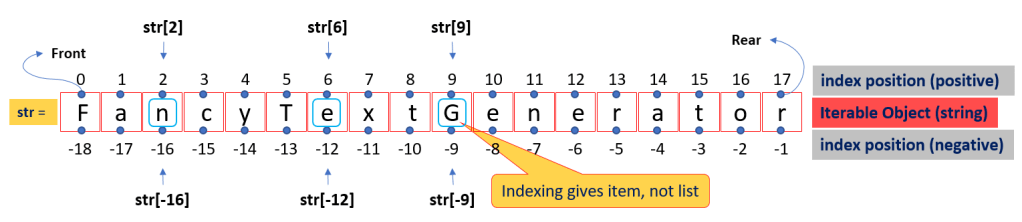
Note: From the picture above let’s say we have an str variable with string data type and the value is “FancyTextGenerator”.
Indexing concept:
- Index-position (positive) means you can do indexing (access your data) if the index value is between Front (0) and Rear (n – 1, where n is the length of your data)
- Index-position (negative), the opposite of index-position (positive) above. You can access your data if the index value is between Front (-1*n, where n is the length of your data) and Rear (-1)
On the example below, you will see how to access data from index-position (positive) and index-position (negative) with the same output:
#Example-01

str = 'FancyTextGenerator'

#Indexing will return an item, not a list
print('{} == {}'.format(str[2], str[-16])) #--> Output: n == n
print('{} == {}'.format(str[6], str[-12])) #--> Output: e == e
print('{} == {}'.format(str[9], str[-9]))  #--> Output: G == G
Slicing
Slice notation (let’s say you have an str variable with string data type):
str[start : stop : step]

or

str[slice(start, stop, step)]
Like the indexing concept, slicing has a slice-position concept that works as a pointer (address) between data items, and you can access your data from slice-position (positive) and/or slice-position (negative). But how to address slice-position is depend on the step parameter. If step>0 it’s mean to select an item from the left-to-right of the data, and vice versa step<0 mean to select the item from the right-to-left (in reversed order). And remember, slicing will return a list. For detail let’s see one by one:
step>0
Python slicing when step>0:
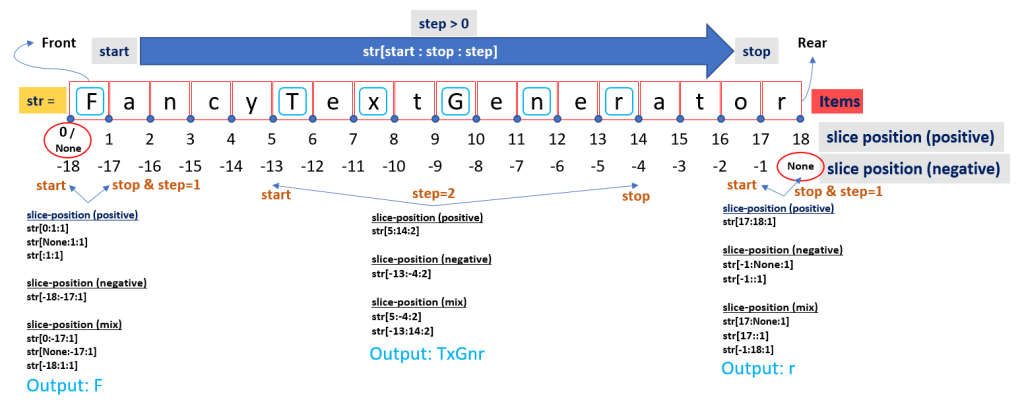
Slicing concept if step>0:
- You can use only slice-position (positive) or slice-position (negative) or mixed both slice-position (positive) and (negative) to slice your data from left-to-right
- In the slice-position (positive), your Front item address can be started by 0 or None; and the Rear item address is ended with n (where n is the length of your data)
- In the slice-position (negative), your Front item address is (-1*n); and the Rear item address is None
- None is not 0, and you can ignore to put the None to slicing notation. Example: str[None:7:1] will be same with str[:7:1]
- By default step value is 1, so you can ignore to put it on slicing notation: Example: str[:7:1] will be the same with str[:7] and str[:7:]
Let’s see the example for the slicing concept above (if step>0):
#Example-02

str = 'FancyTextGenerator'

#Slicing will return a list
print('#None concept')
print('{} == {}\r\n'.format(str[None:7:1], str[:7:1]))           #--> Output: FancyTe == FancyTe

print('#step default value is 1')
print('{} == {} == {}\r\n'.format(str[:7:1], str[:7:], str[:7])) #--> Output: FancyTe == FancyTe == FancyTe


print('#Example from the picture (LEFT)')
print('#slice-position (positive)')
print('{} == {}'.format(str[0:1:1], str[0:1]))             #--> Output: F == F
print('{} == {}'.format(str[None:1:1], str[None:1]))       #--> Output: F == F
print('{} == {}\r\n'.format(str[:1:1], str[:1]))           #--> Output: F == F

print('#slice-position (negative)')
print('{} == {}\r\n'.format(str[-18:-17:1], str[-18:-17])) #--> Output: F == F

print('#slice-position (mix)')
print('{} == {}'.format(str[0:-17:1], str[0:-17]))         #--> Output: F == F
print('{} == {}'.format(str[None:-17:1], str[None:-17]))   #--> Output: F == F
print('{} == {}\r\n'.format(str[-18:1:1], str[-18:1]))     #--> Output: F == F


print('#Example from the picture (MID)')
print('#slice-position (positive)')
print('{}\r\n'.format(str[5:14:2]))    #--> Output: TxGnr == TxGnr

print('#slice-position (negative)')
print('{}\r\n'.format(str[-13:-4:2]))  #--> Output: TxGnr == TxGnr

print('#slice-position (mix)')
print('{}'.format(str[5:-4:2]))        #--> Output: TxGnr == TxGnr
print('{}\r\n'.format(str[-13:14:2]))  #--> Output: TxGnr == TxGnr


print('#Example from the picture (RIGHT)')
print('#slice-position (positive)')
print('{}\r\n'.format(str[17:18:1]))

print('#slice-position (negative)')
print('{}'.format(str[-1:None:1]))
print('{}\r\n'.format(str[-1::1]))

print('#slice-position (mix)')
print('{}'.format(str[17:None:1]))
print('{}'.format(str[17::1]))
print('{}\r\n'.format(str[-1:18:1]))
step<0
Python slicing when step<0:
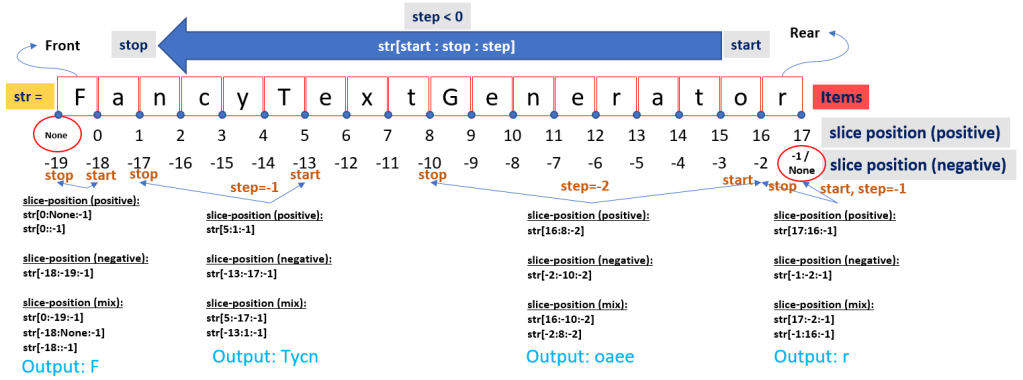
Slicing concept if step<0:
- You can use only slice-position (positive) or slice-position (negative) or mixed both slice-position (positive) and (negative) to slice your data from right-to-left (in reversed order)
- In the slice-position (positive), your Front item address is started by None; and the Rear item address is ended with (n-1), where n is the length of your data
- In the slice-position (negative), your Front item address is started by (-1*(n+1)); and the Rear item address can be ended by None or -1
- None is not 0, and you can ignore to put the None to slicing notation. Example: str[0:None:-1] will be same with str[0::-1]
Let’s see the example for the slicing concept above (if step<0):
#Example-03

str = 'FancyTextGenerator'

print('#Example from the picture (LEFT)')
print('#slice-position (positive)')
print('{} == {}\r\n'.format(str[0:None:-1], str[0::-1])) #--> Output: F == F

print('#slice-position (negative)')
print('{}\r\n'.format(str[-18:-19:-1])) #--> Output: F

print('#slice-position (mix)')
print('{} == {} == {}\r\n'.format(str[0:-19:-1], str[-18:None:-1], str[-18::-1])) #--> Output: F == F == F


print('#Example from the picture (MID: step=-1)')
print('#slice-position (positive)')
print('{}\r\n'.format(str[5:1:-1])) #--> Output: Tycn

print('#slice-position (negative)')
print('{}\r\n'.format(str[-13:-17:-1])) #--> Output: Tycn

print('#slice-position (mix)')
print('{} == {}\r\n'.format(str[5:-17:-1], str[-13:1:-1])) #--> Output: Tycn == Tycn


print('#Example from the picture (MID: step=-2)')
print('#slice-position (positive)')
print('{}\r\n'.format(str[16:8:-2])) #--> Output: oaee

print('#slice-position (negative)')
print('{}\r\n'.format(str[-2:-10:-2])) #--> Output: oaee

print('#slice-position (mix)')
print('{} == {}\r\n'.format(str[16:-10:-2], str[-2:8:-2])) #--> Output: oaee


print('#Example from the picture (RIGHT)')
print('#slice-position (positive)')
print('{}\r\n'.format(str[17:16:-1])) #--> Output: r

print('#slice-position (negative)')
print('{}\r\n'.format(str[-1:-2:-1])) #--> Output: r

print('#slice-position (mix)')
print('{} == {}\r\n'.format(str[17:-2:-1], str[-1:16:-1])) #--> Output: r == r
At this point, you should already know the concepts of index-position (both for positive and negative), slice-position (both for positive and negative), and step parameter will influence your slice-position (both for positive and negative).
Conclusion
Working with Iterable Object slicing in Python, you need to know the below concept:
- Index position. Imagine “Index position” as an address to an item in your data. And remember, indexing will give you an item, not a list.
- Slice position. Imagine “Slice position” as an address between an item in your data. Slicing will give a list (return a list).
- Step. Imagine “Step” as a direction to collect item(s) from your data. step>0 (positive) means start to select item(s) from left-to-right, and step<0 (negative) means start to select item(s) from right-to-left (in reversed order).
 Software Technology