I often find this error “IndexError: index 0 is out of bounds for axis 0 with size 0”, especially when working with multiple arrays with Numpy and the same error can occur for those using Pandas when sending a Series or DataFrame to a numpy.array as with the following (Actually, Pandas is built on the Numpy library):
- pandas.Series.values
- pandas.Series.to_numpy()
- pandas.Series.array
- pandas.DataFrame.values
- pandas.DataFrame.to_numpy()
What does ‘IndexError: index 0 is out of bounds for axis 0 with size 0’ mean? This means:
- You’re trying to access an array with an index which isn’t there or
- Somewhere in your code you create an array with a zero size
Let’s create some examples to deep dive into this error:
Example, IndexError: index 0 is out of bounds for axis 0 with size 0
Let’s try to create an empty numpy.array and try to access it with a zero (0) index:
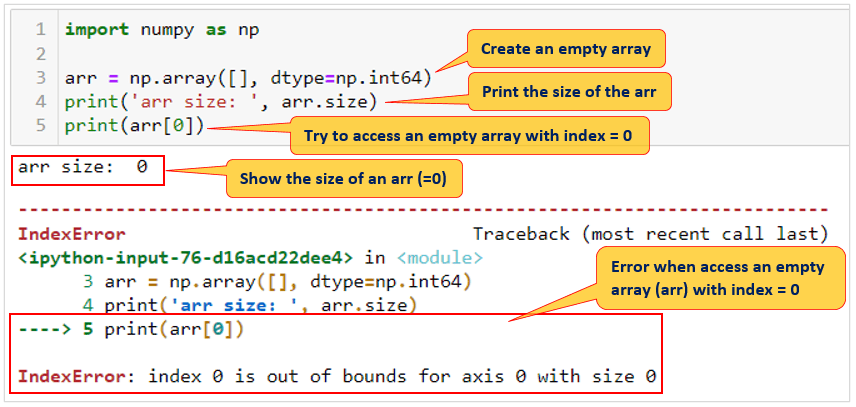
What happens here? You create an empty array (size = 0) and try to access with index = 0. Remember: Index 0 (arr[0]) means you’re trying to access the first element on your array (arr) when actually you have only an empty array (array size is 0).
Example, IndexError: index 1 is out of bounds for axis 0 with size 1
Let’s try to create a one-dimension array with 1 element in the array and try to access the second element (index = 1) when actually we only have 1 element (array size = 1):
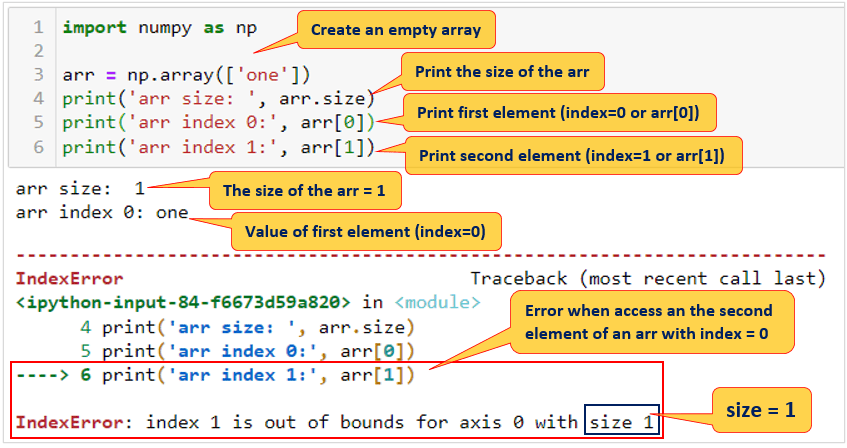
What happens here? You’re trying to access a numpy.array when the index is out of bounds:

Example, error when sending Pandas DataFrame to a numpy.array with pandas.DataFrame.values
Let’s make 2 Pandas DataFrame, when both of DataFrame will have 2 columns (Name and Age), and on this example Name of first DataFrame will be looped and if the Name in the second DataFrame then Age from second DataFrame will be printed.
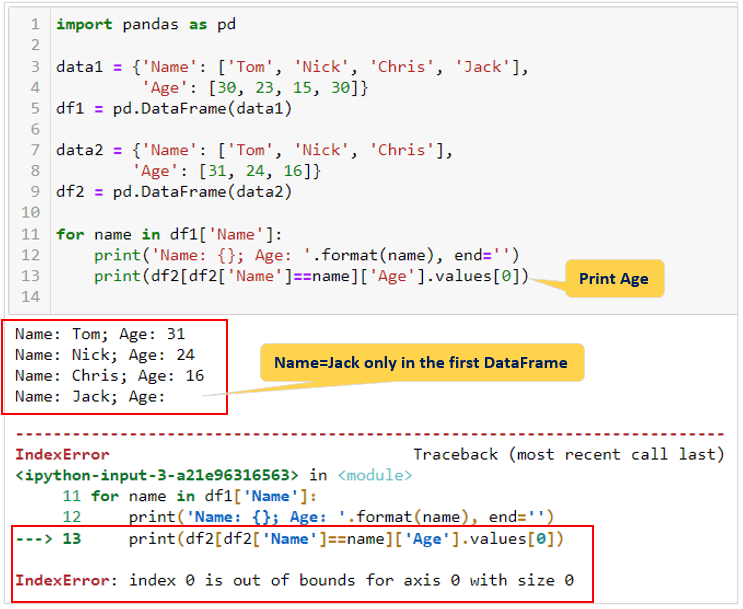
The same thing happens here, we’re trying to access filtered second DataFrame (Name = Jack) when (Name=Jack) is not found in this second DataFrame and it will return an empty DataFrame.
Conclusion
From time to time “IndexError” will come across when you’re working with numpy.array and/or pandas DataFrame. This error can happen when:
- You’re trying to access an array with an index which isn’t there or
- Somewhere in your code you create an array with a zero size
You can be resolving the error by verifying the size of the array is not 0 (if arr.size != 0), and using a try-except block.
 Software Technology