
The main objective of this post is to convert IPython Notebook file (.ipynb) to standalone, one-file Windows executables (.exe) with no need for the installer for client setup, should work plug and play, and be as small as possible.
Below are the steps you need:
- Convert IPython Notebook file (.ipynb) to Python file (.py)
You can use Notebook Menu to save the file directly as a python script or use Jupyter nbconvert command line or use ipython nbconvert command line. Before you can use ipython nbconvert, you need to make sure ipython and nbconvert modules are already installed in your system, else you must install both modules:
$ pip install ipython
$ pip install nbconvert
- Convert Python file (.py) to Windows executable file (.exe)
To convert python file (.py) to Windows executable file (.exe) we need to use pyinstaller but the big issue with pyinstaller is that some python packages do not work and require some overhead, particular installations, dependencies, or settings that can be quite-troublesome to figure out especially if you use “Anaconda Navigator”. The solution here is to go for virtualenv and only use pip to install packages/libraries (don’t use conda for virtual env and installing packages/libraries).
Let’s start with the below hello-world script:
import pandas
print ("hello world, pandas was imported successfully!")
If you run it at Jupiter Notebook you will see the result below:

And then follow the below workflow to convert .ipynb to .py and to .exe:
I. Convert IPython Notebook file (.ipynb) to Python file (.py)
From the notebook menu, you can save the file directly as a python script. Go to the ‘File’ option of the menu, then select ‘Download as’, and there you would see a ‘Python (.py)’ option.

Or you can use jupyter nbconvert from the command line:
$ jupyter nbconvert --to script 'hellow_w.ipynb'
Another option is to use ipython nbconvert from the command line:
$ ipython nbconvert --to script “hello_w.ipynb”
II. Convert Python file (.py) to Windows executable file (.exe)
Let’s try directly to convert python file (.py) above to Windows executable file (.exe) with pyinstaller as below:
$ pyinstaller --onefile –console hello_w.pyYou will find below error:
IMPORTANT: PLEASE READ THIS FOR ADVICE ON HOW TO SOLVE THIS ISSUE!

Importing the numpy C-extensions failed. This error can happen for
many reasons, often due to issues with your setup or how NumPy was
installed.

We have compiled some common reasons and troubleshooting tips at:

    https://numpy.org/devdocs/user/troubleshooting-importerror.html

Please note and check the following:

  * The Python version is: Python3.8 from "C:\Users\danny\anaconda3\python.exe"
  * The NumPy version is: "1.18.5"

and make sure that they are the versions you expect.
Please carefully study the documentation linked above for further help.

Original error was: DLL load failed while importing _multiarray_umath: The specified module could not be found.
To solve this issue, you need to follow below steps:
1. Set up a virtual environment
Install virtualenv and create the environment in your project folder:
First, make sure you have installed virtualenv package in your system before creating the environment in your project folder. Below is the command to install virtualenv:
$ pip install virtualenvCreate Virtual Env in your project directory:
$ virtualenv venvAnd you will get venv folder in your project directory as below:
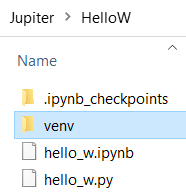
The cool thing with venv is, that you could just provide the venv folder to anyone and all its dependencies simply works.
Next, don’t forget to activate your virtual env:
$ "venv/scripts/activate"
2. Make sure you use pyinstaller from your virtual environment
If you don’t install pyinstaller in your virtual environment then your pyinstaller from your global environment (if installed before) will be used and compiled all of your global packages. So just make sure to activate your virtual environment first, and install the latest version of pyinstaller:
#Install the latest version pyinstaller directly using pip:
$ pip install https://github.com/pyinstaller/pyinstaller/archive/develop.zip
Reference: https://pyinstaller.readthedocs.io/en/stable/when-things-go-wrong.html#getting-the-latest-version
Or just install with the below command:
$ pip install pyinstaller3. Install your packages
Install all of your packages with pip. And in our sample above we use pandas package, so we need to install these packages in our venv:
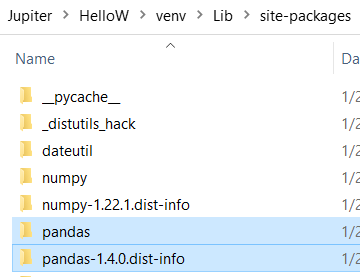
$ pip install pandasAfter the installation finish, you will find below pandas packages:
4. Download upx for compression
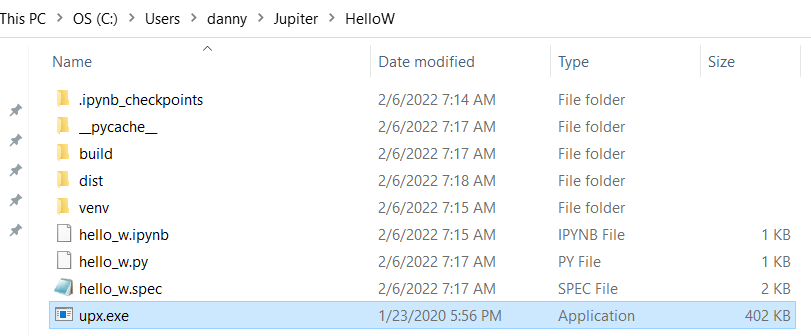
Download the latest upx version to get file compression. In my case, it helped to save 27% file size (in this case). Save upx.exe to your working directory.
5. Compile
The last part is to create the standalone Windows executable file:
$ pyinstaller --onefile --console hello_w.pyIf successful, you will get Windows executable file below:

III. Conclusion
Below are my favorite steps to convert Python file (.ipynb) to Windows executable file (.exe):
#Convert .ipynb to .py
$ ipython nbconvert --to script your_file.ipynb

#Setup virtual environment
$ virtualenv venv
$ "venv/scripts/activate"

#Install pyinstaller in your virtual environment
$ pip install pyinstaller

#Install all your modules/packages (in my example is pandas)
$ pip install pandas

#Save upx.exe in your working directory for file compression {optional}
#Compile: convert .py file to .exe file
$ pyinstaller --onefile --console your_file.py
In more detail:
Microsoft Windows [Version 10.0.19043.1466]
(c) Microsoft Corporation. All rights reserved.

C:\Users\danny>cd jupiter/hellow

C:\Users\danny\Jupiter\HelloW>virtualenv venv
created virtual environment CPython3.8.3.final.0-64 in 752ms
  creator CPython3Windows(dest=C:\Users\danny\Jupiter\HelloW\venv, clear=False, no_vcs_ignore=False, global=False)
  seeder FromAppData(download=False, pip=bundle, setuptools=bundle, wheel=bundle, via=copy, app_data_dir=C:\Users\danny\AppData\Local\pypa\virtualenv)
    added seed packages: pip==21.3.1, setuptools==60.5.0, wheel==0.37.1
  activators BashActivator,BatchActivator,FishActivator,NushellActivator,PowerShellActivator,PythonActivator

C:\Users\danny\Jupiter\HelloW>"venv/scripts/activate"

(venv) C:\Users\danny\Jupiter\HelloW>pip install pyinstaller
Collecting pyinstaller
  Using cached pyinstaller-4.9-py3-none-win_amd64.whl (2.0 MB)
Collecting pywin32-ctypes>=0.2.0
  Using cached pywin32_ctypes-0.2.0-py2.py3-none-any.whl (28 kB)
Collecting pyinstaller-hooks-contrib>=2020.6
  Using cached pyinstaller_hooks_contrib-2022.0-py2.py3-none-any.whl (222 kB)
Requirement already satisfied: setuptools in c:\users\danny\jupiter\hellow\venv\lib\site-packages (from pyinstaller) (60.5.0)
Collecting altgraph
  Using cached altgraph-0.17.2-py2.py3-none-any.whl (21 kB)
Collecting pefile>=2017.8.1
  Using cached pefile-2021.9.3-py3-none-any.whl
Collecting future
  Using cached future-0.18.2-py3-none-any.whl
Installing collected packages: future, pywin32-ctypes, pyinstaller-hooks-contrib, pefile, altgraph, pyinstaller
Successfully installed altgraph-0.17.2 future-0.18.2 pefile-2021.9.3 pyinstaller-4.9 pyinstaller-hooks-contrib-2022.0 pywin32-ctypes-0.2.0
WARNING: You are using pip version 21.3.1; however, version 22.0.3 is available.
You should consider upgrading via the 'C:\Users\danny\Jupiter\HelloW\venv\Scripts\python.exe -m pip install --upgrade pip' command.

(venv) C:\Users\danny\Jupiter\HelloW>pip install pandas
Collecting pandas
  Using cached pandas-1.4.0-cp38-cp38-win_amd64.whl (10.6 MB)
Collecting python-dateutil>=2.8.1
  Using cached python_dateutil-2.8.2-py2.py3-none-any.whl (247 kB)
Collecting numpy>=1.18.5
  Using cached numpy-1.22.2-cp38-cp38-win_amd64.whl (14.7 MB)
Collecting pytz>=2020.1
  Using cached pytz-2021.3-py2.py3-none-any.whl (503 kB)
Collecting six>=1.5
  Using cached six-1.16.0-py2.py3-none-any.whl (11 kB)
Installing collected packages: six, pytz, python-dateutil, numpy, pandas
Successfully installed numpy-1.22.2 pandas-1.4.0 python-dateutil-2.8.2 pytz-2021.3 six-1.16.0
WARNING: You are using pip version 21.3.1; however, version 22.0.3 is available.
You should consider upgrading via the 'C:\Users\danny\Jupiter\HelloW\venv\Scripts\python.exe -m pip install --upgrade pip' command.

(venv) C:\Users\danny\Jupiter\HelloW>ipython nbconvert --to script hello_w.ipynb
[TerminalIPythonApp] WARNING | Subcommand `ipython nbconvert` is deprecated and will be removed in future versions.
[TerminalIPythonApp] WARNING | You likely want to use `jupyter nbconvert` in the future
[NbConvertApp] Converting notebook hello_w.ipynb to script
[NbConvertApp] Writing 136 bytes to hello_w.py

(venv) C:\Users\danny\Jupiter\HelloW>pyinstaller --onefile --console hello_w.py
612 WARNING: Assuming this is not an Anaconda environment or an additional venv/pipenv/... environment manager is being used on top, because the conda-meta folder C:\Users\danny\Jupiter\HelloW\venv\conda-meta does not exist.
612 INFO: PyInstaller: 4.9
612 INFO: Python: 3.8.3 (conda)
612 INFO: Platform: Windows-10-10.0.19041-SP0
632 INFO: wrote C:\Users\danny\Jupiter\HelloW\hello_w.spec
635 INFO: UPX is not available.
640 INFO: Extending PYTHONPATH with paths
['C:\\Users\\danny\\Jupiter\\HelloW']
852 INFO: checking Analysis
852 INFO: Building Analysis because Analysis-00.toc is non existent
852 INFO: Initializing module dependency graph...
852 INFO: Caching module graph hooks...
884 INFO: Analyzing base_library.zip ...
2800 INFO: Processing pre-find module path hook distutils from 'C:\\Users\\danny\\Jupiter\\HelloW\\venv\\lib\\site-packages\\PyInstaller\\hooks\\pre_find_module_path\\hook-distutils.py'.
2800 INFO: distutils: retargeting to non-venv dir 'C:\\Users\\danny\\anaconda3\\lib'
4716 INFO: Caching module dependency graph...
4895 INFO: running Analysis Analysis-00.toc
4898 INFO: Adding Microsoft.Windows.Common-Controls to dependent assemblies of final executable
  required by C:\Users\danny\Jupiter\HelloW\venv\Scripts\python.exe
5458 INFO: Analyzing C:\Users\danny\Jupiter\HelloW\hello_w.py
6033 INFO: Processing pre-find module path hook site from 'C:\\Users\\danny\\Jupiter\\HelloW\\venv\\lib\\site-packages\\PyInstaller\\hooks\\pre_find_module_path\\hook-site.py'.
6033 INFO: site: retargeting to fake-dir 'C:\\Users\\danny\\Jupiter\\HelloW\\venv\\lib\\site-packages\\PyInstaller\\fake-modules'
10647 INFO: Processing pre-safe import module hook six.moves from 'C:\\Users\\danny\\Jupiter\\HelloW\\venv\\lib\\site-packages\\PyInstaller\\hooks\\pre_safe_import_module\\hook-six.moves.py'.
12691 INFO: Processing module hooks...
12691 INFO: Loading module hook 'hook-difflib.py' from 'C:\\Users\\danny\\Jupiter\\HelloW\\venv\\lib\\site-packages\\PyInstaller\\hooks'...
12691 INFO: Loading module hook 'hook-distutils.py' from 'C:\\Users\\danny\\Jupiter\\HelloW\\venv\\lib\\site-packages\\PyInstaller\\hooks'...
12691 INFO: Loading module hook 'hook-distutils.util.py' from 'C:\\Users\\danny\\Jupiter\\HelloW\\venv\\lib\\site-packages\\PyInstaller\\hooks'...
12706 INFO: Loading module hook 'hook-encodings.py' from 'C:\\Users\\danny\\Jupiter\\HelloW\\venv\\lib\\site-packages\\PyInstaller\\hooks'...
12769 INFO: Loading module hook 'hook-heapq.py' from 'C:\\Users\\danny\\Jupiter\\HelloW\\venv\\lib\\site-packages\\PyInstaller\\hooks'...
12784 INFO: Loading module hook 'hook-lib2to3.py' from 'C:\\Users\\danny\\Jupiter\\HelloW\\venv\\lib\\site-packages\\PyInstaller\\hooks'...
12816 INFO: Loading module hook 'hook-multiprocessing.util.py' from 'C:\\Users\\danny\\Jupiter\\HelloW\\venv\\lib\\site-packages\\PyInstaller\\hooks'...
12816 INFO: Loading module hook 'hook-numpy.py' from 'C:\\Users\\danny\\Jupiter\\HelloW\\venv\\lib\\site-packages\\PyInstaller\\hooks'...
12863 INFO: Import to be excluded not found: 'f2py'
12894 INFO: Loading module hook 'hook-numpy._pytesttester.py' from 'C:\\Users\\danny\\Jupiter\\HelloW\\venv\\lib\\site-packages\\PyInstaller\\hooks'...
12894 INFO: Loading module hook 'hook-pandas.io.formats.style.py' from 'C:\\Users\\danny\\Jupiter\\HelloW\\venv\\lib\\site-packages\\PyInstaller\\hooks'...
14095 WARNING: Hidden import "jinja2" not found!
14095 INFO: Loading module hook 'hook-pandas.plotting.py' from 'C:\\Users\\danny\\Jupiter\\HelloW\\venv\\lib\\site-packages\\PyInstaller\\hooks'...
14158 INFO: Loading module hook 'hook-pandas.py' from 'C:\\Users\\danny\\Jupiter\\HelloW\\venv\\lib\\site-packages\\PyInstaller\\hooks'...
14658 INFO: Loading module hook 'hook-pickle.py' from 'C:\\Users\\danny\\Jupiter\\HelloW\\venv\\lib\\site-packages\\PyInstaller\\hooks'...
14658 INFO: Loading module hook 'hook-pkg_resources.py' from 'C:\\Users\\danny\\Jupiter\\HelloW\\venv\\lib\\site-packages\\PyInstaller\\hooks'...
14861 INFO: Processing pre-safe import module hook win32com from 'C:\\Users\\danny\\Jupiter\\HelloW\\venv\\lib\\site-packages\\_pyinstaller_hooks_contrib\\hooks\\pre_safe_import_module\\hook-win32com.py'.
15071 WARNING: Hidden import "pkg_resources.py2_warn" not found!
15071 WARNING: Hidden import "pkg_resources.markers" not found!
15071 INFO: Loading module hook 'hook-pytz.py' from 'C:\\Users\\danny\\Jupiter\\HelloW\\venv\\lib\\site-packages\\PyInstaller\\hooks'...
15274 INFO: Loading module hook 'hook-setuptools.py' from 'C:\\Users\\danny\\Jupiter\\HelloW\\venv\\lib\\site-packages\\PyInstaller\\hooks'...
15836 INFO: Loading module hook 'hook-sqlite3.py' from 'C:\\Users\\danny\\Jupiter\\HelloW\\venv\\lib\\site-packages\\PyInstaller\\hooks'...
15899 INFO: Loading module hook 'hook-sysconfig.py' from 'C:\\Users\\danny\\Jupiter\\HelloW\\venv\\lib\\site-packages\\PyInstaller\\hooks'...
15899 INFO: Loading module hook 'hook-win32ctypes.core.py' from 'C:\\Users\\danny\\Jupiter\\HelloW\\venv\\lib\\site-packages\\PyInstaller\\hooks'...
16025 INFO: Loading module hook 'hook-xml.dom.domreg.py' from 'C:\\Users\\danny\\Jupiter\\HelloW\\venv\\lib\\site-packages\\PyInstaller\\hooks'...
16025 INFO: Loading module hook 'hook-xml.etree.cElementTree.py' from 'C:\\Users\\danny\\Jupiter\\HelloW\\venv\\lib\\site-packages\\PyInstaller\\hooks'...
16025 INFO: Loading module hook 'hook-xml.py' from 'C:\\Users\\danny\\Jupiter\\HelloW\\venv\\lib\\site-packages\\PyInstaller\\hooks'...
16040 INFO: Loading module hook 'hook-_tkinter.py' from 'C:\\Users\\danny\\Jupiter\\HelloW\\venv\\lib\\site-packages\\PyInstaller\\hooks'...
16165 INFO: checking Tree
16165 INFO: Building Tree because Tree-00.toc is non existent
16165 INFO: Building Tree Tree-00.toc
16235 INFO: checking Tree
16235 INFO: Building Tree because Tree-01.toc is non existent
16236 INFO: Building Tree Tree-01.toc
16304 INFO: checking Tree
16304 INFO: Building Tree because Tree-02.toc is non existent
16304 INFO: Building Tree Tree-02.toc
16325 INFO: Loading module hook 'hook-setuptools.msvc.py' from 'C:\\Users\\danny\\Jupiter\\HelloW\\venv\\lib\\site-packages\\PyInstaller\\hooks'...
16372 INFO: Looking for ctypes DLLs
16418 INFO: Analyzing run-time hooks ...
16434 INFO: Including run-time hook 'C:\\Users\\danny\\Jupiter\\HelloW\\venv\\lib\\site-packages\\PyInstaller\\hooks\\rthooks\\pyi_rth_subprocess.py'
16434 INFO: Including run-time hook 'C:\\Users\\danny\\Jupiter\\HelloW\\venv\\lib\\site-packages\\PyInstaller\\hooks\\rthooks\\pyi_rth_pkgutil.py'
16434 INFO: Including run-time hook 'C:\\Users\\danny\\Jupiter\\HelloW\\venv\\lib\\site-packages\\PyInstaller\\hooks\\rthooks\\pyi_rth_multiprocessing.py'
16434 INFO: Including run-time hook 'C:\\Users\\danny\\Jupiter\\HelloW\\venv\\lib\\site-packages\\PyInstaller\\hooks\\rthooks\\pyi_rth_inspect.py'
16434 INFO: Including run-time hook 'C:\\Users\\danny\\Jupiter\\HelloW\\venv\\lib\\site-packages\\PyInstaller\\hooks\\rthooks\\pyi_rth_pkgres.py'
16465 INFO: Looking for dynamic libraries
16825 INFO: Looking for eggs
16825 INFO: Using Python library C:\Users\danny\Jupiter\HelloW\venv\Scripts\python38.dll
16825 INFO: Found binding redirects:
[]
16843 INFO: Warnings written to C:\Users\danny\Jupiter\HelloW\build\hello_w\warn-hello_w.txt
16989 INFO: Graph cross-reference written to C:\Users\danny\Jupiter\HelloW\build\hello_w\xref-hello_w.html
17034 INFO: checking PYZ
17034 INFO: Building PYZ because PYZ-00.toc is non existent
17036 INFO: Building PYZ (ZlibArchive) C:\Users\danny\Jupiter\HelloW\build\hello_w\PYZ-00.pyz
18270 INFO: Building PYZ (ZlibArchive) C:\Users\danny\Jupiter\HelloW\build\hello_w\PYZ-00.pyz completed successfully.
18299 INFO: checking PKG
18299 INFO: Building PKG because PKG-00.toc is non existent
18300 INFO: Building PKG (CArchive) hello_w.pkg
27221 INFO: Building PKG (CArchive) hello_w.pkg completed successfully.
27242 INFO: Bootloader C:\Users\danny\Jupiter\HelloW\venv\lib\site-packages\PyInstaller\bootloader\Windows-64bit\run.exe
27242 INFO: checking EXE
27242 INFO: Building EXE because EXE-00.toc is non existent
27243 INFO: Building EXE from EXE-00.toc
27243 INFO: Copying bootloader EXE to C:\Users\danny\Jupiter\HelloW\dist\hello_w.exe
27392 INFO: Copying icon to EXE
27392 INFO: Copying icons from ['C:\\Users\\danny\\Jupiter\\HelloW\\venv\\lib\\site-packages\\PyInstaller\\bootloader\\images\\icon-console.ico']
27472 INFO: Writing RT_GROUP_ICON 0 resource with 104 bytes
27472 INFO: Writing RT_ICON 1 resource with 3752 bytes
27488 INFO: Writing RT_ICON 2 resource with 2216 bytes
27488 INFO: Writing RT_ICON 3 resource with 1384 bytes
27488 INFO: Writing RT_ICON 4 resource with 37019 bytes
27488 INFO: Writing RT_ICON 5 resource with 9640 bytes
27488 INFO: Writing RT_ICON 6 resource with 4264 bytes
27488 INFO: Writing RT_ICON 7 resource with 1128 bytes
27496 INFO: Copying 0 resources to EXE
27496 INFO: Emedding manifest in EXE
27497 INFO: Updating manifest in C:\Users\danny\Jupiter\HelloW\dist\hello_w.exe
27571 INFO: Updating resource type 24 name 1 language 0
27579 INFO: Appending PKG archive to EXE
37559 INFO: Building EXE from EXE-00.toc completed successfully.

(venv) C:\Users\danny\Jupiter\HelloW>cd dist

(venv) C:\Users\danny\Jupiter\HelloW\dist>hello_w
hello world, pandas was imported successfully!

(venv) C:\Users\danny\Jupiter\HelloW\dist>
That’s it, I hope this post will help you.
 Software Technology