Pandas Series is a one-dimensional labeled-array that capable to hold of any data type. Labels must be a hashable type. And element in the series can be accessed similarly to ndarray from numpy library (to create ndarray need to import numpy library). Elements of a series can be accessed in two ways: position or label/index.
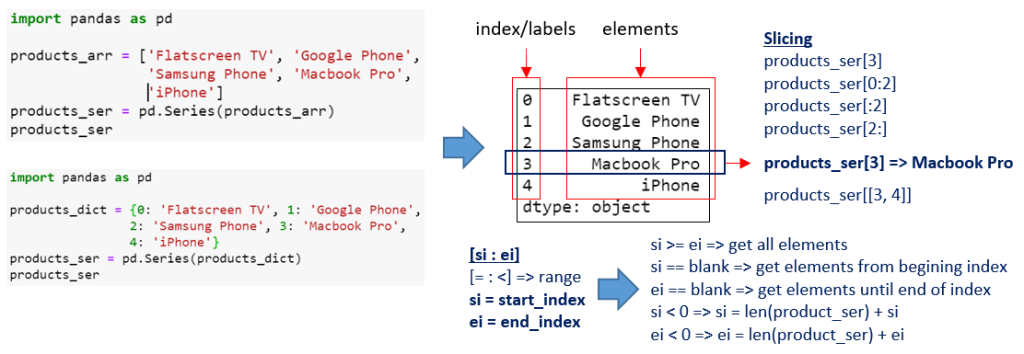
From the picture above shows how to access the Pandas Series “Slicing” value and for more details, let’s see the example below:
How to access the Pandas Series index and value(s)?
Let’s see example below:
import pandas as pd

products_array = [
    'Flatscreen TV', 'Google Phone',
    'Samsung Phone', 'Macbook Pro',
    'iPhone'
];

products_series = pd.Series(products_array)

print(type(products_series)) #Example-01
print(products_series.index) #Example-02
print(products_series[3])    #Example-03
print(products_series[[3]])  #Example-04
print(products_series[1:4])  #Example-05
#Example-01
The output will display the type of products_series variable:
<class 'pandas.core.series.Series'>#Example-02
The output will display the Index/label of Series:
RangeIndex(start=0, stop=5, step=1)#Example-03
The output will display the value (element) of products_series with index 3:
Macbook Pro#Example-04
The output will display a chunk of the products_series variable (and the output of the chunked data type should be pandas.core.series.Series):
3    Macbook Pro
dtype: object
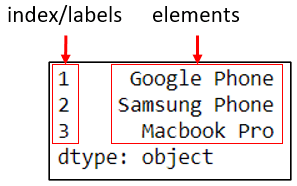
Example, below script will chunked index start from 1 until 3:
chunked = products_series[[1,2,3]]
print(chunked)
Output:
#Example-05
Same with #Example-04 above, The output will display a chunk of the products_series variable (and the output of the chunked data type should be pandas.core.series.Series):
 Software Technology